
How do I manage automating Windows Updates when I am leveraging the Unified Write Filter?

To handle updates for your Windows 10 IoT Devices, we recommend using the following packages for easy deployment. The UWF servicing package will disable the write filter and reboot the into a UWF Servicing account where all available Windows updates will be downloaded an applied. The client will not be usable while this occurs. Once updates are done it will reboot and disable the UWF Servicing account and will re-enable the write filter.

https://www.dropbox.com/scl/fi/gi2v64mcwha8nndwbclsc/UWF-Servicing-Apply-Windows-Updates.tzu?rlkey=007z8bs6y04t1ojh3vbc93tkb&st=vdccxqqs&dl=0

Once updates are installed, it is recommend to clean out the WinSXS folder so that the units do not run out of disk space. The below package will run dism.exe to free up the space consumed by the update packages.

https://www.dropbox.com/scl/fi/etg5eqn5krtart2ku13sp/Clean-Windows-Updates.tzu?rlkey=hv86x93lvaf5w426tq8nykj1c&st=fwyjos8s&dl=0

Once the updates are done and the folder is cleaned up you can use the following package to disable Windows Updates so they do not interrupt your end users.

https://www.dropbox.com/scl/fi/dfgt3td5w2yxo75vtucwl/Disable-Windows-Updates.tzu?rlkey=1oiov8kbuogfvmixe850wecf4&st=uuagozgw&dl=0

You can use the 10zig Manager to set all of these to run as a scheduled task to keep the units up to date without interaction.

NOTE: This process does not monitor available drive space before or during the update process. You must always ensure that you have adequate free space available on your 10ZiG client before running any Windows update to avoid leaving the unit in an unusable state.

How do I configure Citrix Workspace App for Windows to leverage H.265 hardware acceleration on supported 10ZiG models (4510/5910q)?

Add the following registry key to your 10ZiG Windows 10 IoT Client:

[HKEY_LOCAL_MACHINE\SOFTWARE\Policies\Citrix\ICA Client\Graphics Engine]

“EnableH265″=dword:00000001

What is UWF and how do I use it?

Where can I find a QSG for Windows 10 loT?

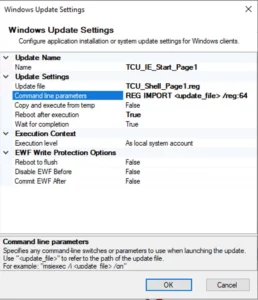
How do I import client registry changes via 10ZiG Manager Package Manager for W10 IoT x64 based clients?

Assign the reg file containing necessary changes in the update file field and for command line parameters be sure to include the /reg:64 parameter as per following example ‘REG IMPORT /reg:64’

A duplicate copy of the same attached USB printer is seen inside the virtual desktop.

The duplicate printer appears because RDP printer redirection is enabled while USB redirection is enabled in the Virtual Desktop Manager Client.

RDP presents the printer through the printer redirection feature at the same time the USB device is presented by Virtual Desktop Manager to the virtual desktop.

To correct this issue, disable RDP printer redirection using either a registry key or a policy:

    • Modify the following registry key:

HKCU\Software\VMware, Inc.\VMware VDM\Client\RDP Settings\RedirectPrinters

Set the value to false

Which models support Ultra-Wide Resolution @ 5120×1440?

The 10ZiG 6100 series supports this resolution. At this time other models are not supported.

Where can I find the End User License Agreement (EULA)?

Please find the EULA at 10ZiG EULA

Become a 10ZiG Ready Partner

Apply to become a 10ZiG Ready Partner HERE and let’s start creating great stories together.

Get Your 30-Day
Free Demo

Experience the power of 10ZiG risk-free. No credit card. No obligation.