What Is a Thin Client And What Are Its Benefits?

What Is a Thin Client And What Are Its Benefits?

Thin Client Definition

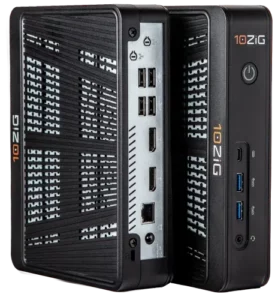
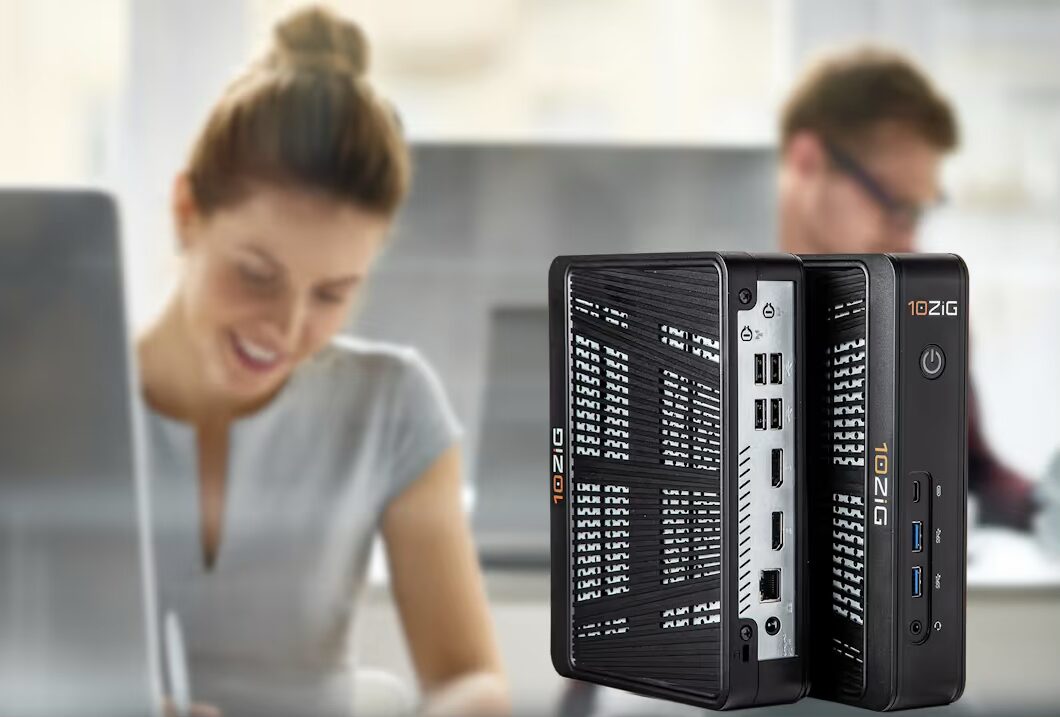
What is a Thin Client? Thin Clients will often cut the fat right out of unwanted spending, overuse of power consumption and space, noisy environments, unsafe lack of security, and more. A traditional Fat Client is a typical PC/tower. If you’re operating a business or school or government office… or, anywhere several end users are gathered, Fat Clients can have a big and undesirable effect on your IT front. They are loud, guzzle energy, take up room, and if anything goes wrong, your IT staff must come directly to the PC endpoint in order to get anything done – from upgrades to viruses, and everything in-between. A Thin Client is a lightweight, small piece of hardware designed for virtual desktop infrastructure (VDI) solutions. Everything is stored on your server/data center and not on individual PCs.. A Thin Client is a low-cost, locked-down device that saves energy, IT resources, and includes utility software for centralized and easy management and deployment. It is a small form factor, solid-state hardware, and if you’re working with the right vendor, should come with a superior advanced warranty program. IT Professionals can manage and troubleshoot endpoints and assist their end users in just one, sometimes offsite, central location.

Thin Client VDI Environment

What is a Thin Client and VDI environment like? Virtual Desktop Infrastructure (VDI) is all about moving desktop management from a local environment to a virtualized one. VDI is the practice of hosting workstation operating systems and applications on a server. End users can access virtualized operating systems and applications from any device including Thin (and Zero) Clients for VDI, as long as the device can connect to the host server. Because the operating systems and applications are virtualized, they can be accessed by devices running on different operating systems. Thin Clients are easier to deploy, manage, and maintain than Fat PCs. Centralized management software allows administrators to save time and money by maintaining all devices from a server; meaning upgrades, application deployments, and virus control can be centrally managed, rather than being handled individually at endpoint workstations. By design, Thin Client solutions don’t really have any moving parts, and therefore also provide a much longer life expectancy than a Fat Client/PC. When it comes to security, Thin Clients prevent end users from loading applications onto their own devices, which significantly reduces the risk of viruses. If you have considered or are headed in a VDI direction with your IT front, why continue to struggle with brash, energy-hungry, overpowered Fat PCs that run a local Windows, full-blown OS requiring regular patching, anti-virus, and imaging, etc? This just no longer make sense in today’s modern or remote IT environments.

Thin Client Device Support & Options

As a Thin Client endpoint user, you will have some degree of an internal operating system such as Linux or Windows (WES7/WE8S/W10loT). You will have no hard drive, but will have some local storage for customization of end user applications. You will be able to run and change multiple connection supported or certified brokers like VMware, Microsoft RDSH, Citrix, or Parallels. Hopefully, Thin Clients should come with a no-cost centralized management utility and Cloud capability option that is quick to install, get up and running, and can manage one or several central configurations with ease. Software and hardware support for graphic demand and multimedia acceleration for your set-up can provide anything from basic to high-level, including support of Full HD Audio/Video Flash, HTML5. Thin Clients are designed to work for specific Operating Systems (OS) and fully customized to work with related VDI platforms. Their cutting-edge technology can offer an end user very low level to very high level applications and graphics support. They come with a variation of connectivity ports and expansion slots as well as mounting options. Sometimes, their networking power can be Power over Ethernet (PoE)… and, if you’ve got a good vendor, not only does a centralized management software utility come with a client hardware purchase, it will be a no cost.

Thin Clients With 10ZiG

  • Operating Systems: Linux, WES7, WE8S, Windows 10IoT, Windows 11
  • Platform(s) Support: VMWare Horizon; PCoIP, Blast Extreme (H.264/H.265), RDP – Citrix; HDX Ready, HDX Premium, HDX 3D Pro – Microsoft VDI/RDSH – RDP – Parallels; Remote Application Service (RAS)
  • Applications/Graphics Support: Web Browsers (Chrome, Firefox, Internet Explorer), iSeries/5250 Emulation, VNC (Shadowing), GStreamer, Window Play Media, Adobe Reader, PDF Viewer, Power Term, Office Viewers, Flash Support, and more
  • Display & Monitors: Single, Dual, Triple, and Quad Screen Support, DVI-Ds, DVI-Is, VGAs (with Converters), DisplayPorts
  • Connectivity: HDMI, DisplayPort, Internal Smart Card (CAC), Expansion Slot PCI, Parallel Port, Serial Port, USB 3.0 Ports, USB 2.0 Ports
  • Networking: 10/100/1000 Base-T Gigabit Ethernet, 802.11 a/b/g/n/ac dual band, Power over Ethernet (PoE), Fiber
  • Mountings: Vertical Stand, VESA Mounting Bracket
  • Centralized Management Utility: FREE Software with Device Purchase
  • Free Demo: FREE, 30 Days, No Obligation, Hassle-Free
  • Warranty: No-Cost, Advance Replacement
  • Cost: Competitively Priced
  • Tech Support: Available, Local, No-Charge, Friendly
  • HD Video/Audio, Flash/HTML5, video conferencing, 3D, CAD & 4K resolutions… supporting Dual, Triple, and even Quad Screen.

Thin Client 10ZiG Hardware

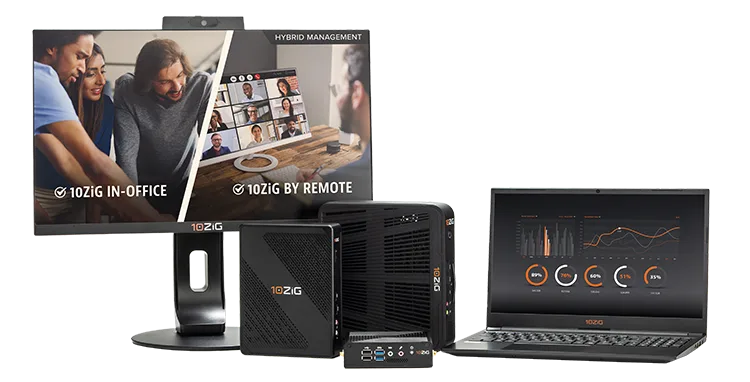
The 10ZiG Zero Client lineup below provides a solution for all user types, from task workers up through the most demanding power users.

Thin Clients: About 10ZiG

10ZiG Technology is a world-market leader in Thin Client & Zero Client endpoint devices for Virtual Desktop Infrastructure and VDI security. 10ZiG provides leading Intel and AMD based Dual and Quad Core Thin Clients & Zero Clients for VMware Blast Extreme, Citrix HDX, Teradici PCoIP, Microsoft environments, and more. 10ZiG offers free, no-obligation demo devices, Technical Support teams based in the U.S. and U.K., and as mentioned, provides ā€œThe 10ZiG Manager,ā€ our exclusive Centralized Management Software console with cloud capabilities, completely at no charge with unlimited user licenses supported. Get your free evaluation device today.

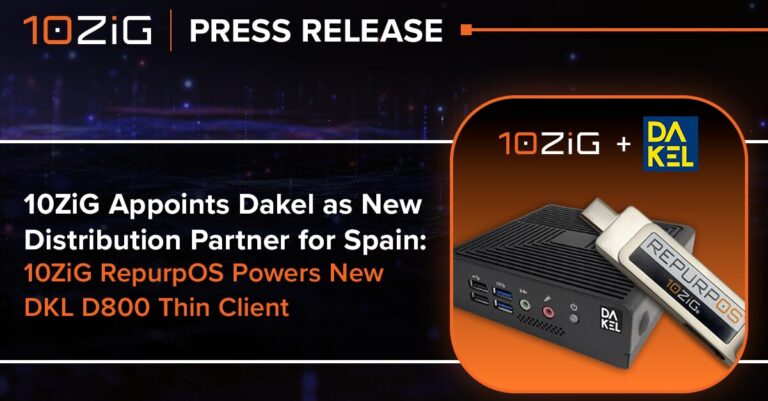
10ZiG Appoints Dakel as New Distribution Partner for Spain; 10ZiG RepurpOS Powers New DKL D800 Thin Client

10ZiG Appoints Dakel as New Distribution Partner for Spain

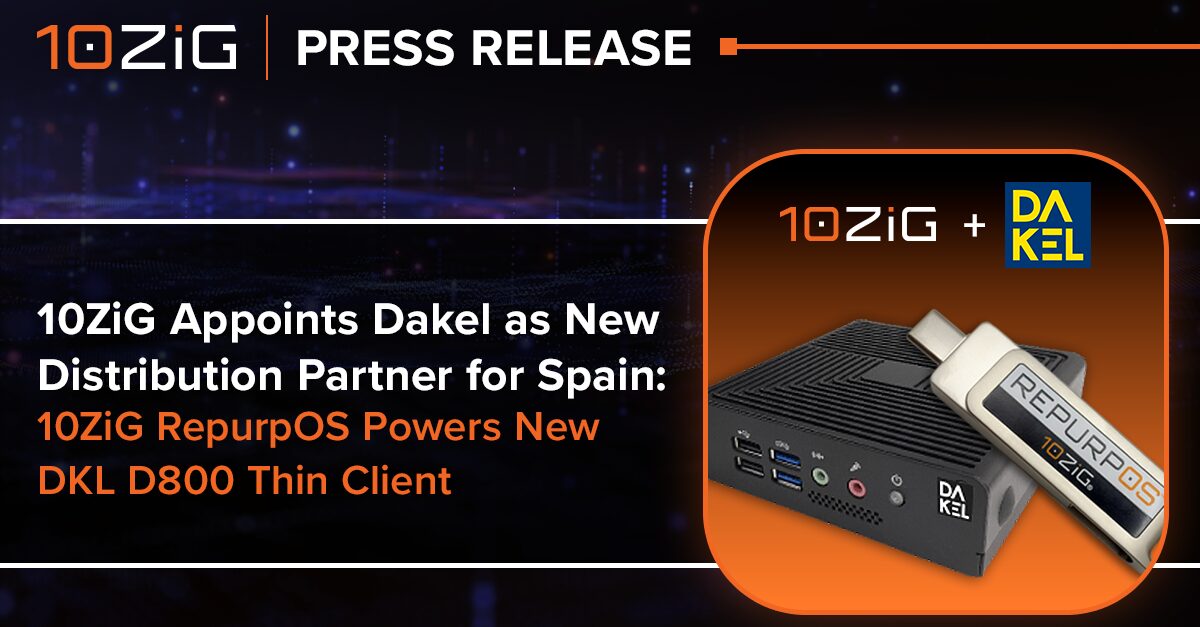
10ZiG Appoints Dakel as New Distribution Partner for Spain; 10ZiG RepurpOS Powers New DKL D800 Thin Client

Partnership expands 10ZiG’s European footprint and introduces a ruggedized thin client optimized for industrial environments

PHOENIX – February 12, 2026 – 10ZiG Technology, a leading provider of thin and zero client hardware and software solutions for VDI, DaaS, and web application environments, today announced that Dakel has been named its new distribution partner for Spain. As part of the partnership, Dakel has launched the DKL D800, a new thin client designed specifically for industrial and specialized professional environments and powered by 10ZiG RepurpOSā„¢ software.

With more than 30 years of experience delivering IT solutions for businesses, Dakel brings deep expertise in custom-configured server systems, optimized data storage for vertical markets, thin client solutions, and a wide range of supporting infrastructure technologies. The partnership strengthens 10ZiG’s growing presence across Europe while enabling Spanish customers to access purpose-built thin client solutions that meet the demanding requirements of industrial use cases and the price-sensitive needs of Spain’s highly competitive endpoint market.

Extending Secure, Centrally Managed Thin Clients to the Industrial Edge

The new DKL D800 combines Dakel’s industrial design and systems integration capabilities with 10ZiG RepurpOS, 10ZiG’s powerful repurposing and endpoint operating system software. Built for reliability in harsh or space-constrained environments, the DKL D800 extends the benefits of centralized management, strong security, and flexible endpoint configuration to manufacturing floors, logistics operations, and other industrial settings.

Unlike traditional hardware-and-software bundles, this relationship is built around software: 10ZiG provides RepurpOS to power Dakel’s DKL D800, while Dakel sources the hardware directly and delivers a fully branded, market-ready thin client. This approach helps Dakel serve customers seeking an entry-level, industrial-ready endpoint while maintaining the flexibility to address additional vertical and mid-market requirements over time.

ā€œThis partnership with Dakel is an important step in expanding 10ZiG’s reach across Southern Europe and reinforces our continued growth throughout the region,ā€ said James Broughton, Sales Director EMEA, 10ZiG Technology. ā€œBy enabling Dakel to build and brand its own device around 10ZiG RepurpOS, we’re helping customers in Spain access secure, centrally managed thin client experiences at a price point and form factor that fits their environment—without compromise on manageability or control.ā€

By leveraging 10ZiG RepurpOS technology, the DKL D800 delivers centralized control, strong endpoint security, and support for a wide range of VDI, DaaS, and web-based application platforms. The device is fully manageable through 10ZiG Managerā„¢, allowing IT teams to efficiently deploy, configure, and maintain endpoints at scale while reducing operational complexity and total cost of ownership.

ā€œPartnering with 10ZiG allows us to deliver a thin client solution that truly aligns with the needs of industrial and professional environments,ā€ said Ana Rueda, Director of Marketing, Dakel. ā€œWith RepurpOS at the core of the DKL D800, we can offer customers a secure, centrally managed endpoint experience while delivering a device engineered for demanding settings. It’s easy to deploy, simple to manage, and built for long-term value.ā€

The appointment of Dakel as a distribution partner underscores 10ZiG’s commitment to investing in regional partnerships and expanding access to its thin client portfolio across Europe. Together, 10ZiG and Dakel are positioned to support organizations seeking secure, manageable, and cost-effective endpoint solutions tailored to both traditional enterprise and industrial use cases including customers looking for straightforward, entry-level thin client deployments in Spain’s small-to-mid-sized market segment.

For more information on Dakel’s 10ZiG RepurpOS-powered DKL D800 thin client, visit https://dakel.com/thin-client/10zig-thin-client/. Additional details on the full range of 10ZiG thin client solutions are available at https://www.10zig.com/product/solutions/thin-clients/.

About 10ZiG Technology

10ZiG Technology is a leading Thin & Zero Client hardware and software provider delivering a modernized and secure user experience for VDI, DaaS, or Web-based environments. With 22+ years in the Thin Client endpoint market, no-hassle repurposing software, and easy-to-use free management, 10ZiG is the perfect Single-Vendor Strategy. With local support included and a wide range of TAA Compliant options from traditional desktop form factor, Thin Client laptops, and All-In-Ones, along with an array of unique features including Fiber, Wireless support, quad screen, and more, 10ZiG is the secure, managed solution for today’s diverse IT requirements. Our ever-growing 10ZiG ecosystem of technology partners helps keep 10ZiG product cutting-edge and flexible by incorporating leading connection brokers like Omnissa, Microsoft, Citrix, and more. Find your solution at www.10zig.com

Corporate Headquarters, US

10ZiG Technology Inc.

2043 West Lone Cactus Drive

Phoenix, AZ 85027, USA

+1 (866) 865-5250 | Email: [email protected] | Web: www.10ZiG.com

EMEA Headquarters

10ZiG Technology Ltd.

7 Highcliffe Road

Leicester LE5 1TY, UK

+44 (0) 116 2148650 | Email: [email protected] | Web: www.10ZiG.com

DACH Headquarters

10ZiG Technology GmbH

Nymphenburger Straße 3b

80335 München

0160 92472602 | Email: [email protected] | Web: www.10ZiG.de

5 Things to Know About Thin Clients for Cloud Workspaces & Virtual Desktops

5 Things to Know About Thin Clients for Cloud Workspaces & Virtual Desktops

Are you just getting started with Thin Clients and not sure where to begin? Or are you looking to compare Thin Client providers before making an investment in this technology? You’re in luck because here, we cover a lot of Thin Client considerations that you should know about.

We’ll start by discussing the hardware of Thin Clients because, that’s what fundamentally defines this technology. Then, we’ll cover software, which is what is used for Cloud Workspace and Virtual Desktop connectivity, functionality, operations management, deployment, and more. After that, we’ll dive into more specific topics that you’ll need to understand to make an informed decision when considering Thin Clients, like cybersecurity, graphics processing, and support.

#1- What is Thin Client Hardware?

A Thin Client is generally smaller and slimmer than a normal PC. It doesn’t contain the extent of hardware that a fat PC does, which allows it to fit everything needed right into its smaller form factor.

Most computers need plenty of CPU to run processes, greater amounts of RAM to perform multiple tasks at once, and a hard drive, or solid-state drive, to hold data. While Thin Clients do contain all of these elements, they are generally much smaller in capacity because most of the computer’s workload is NOT run on the machine itself. Instead, Thin Clients only need enough resources to boot up and connect to a centralized computer, such as a high-powered server in a data center. That computer then uses its resources to provide the Thin Client setup with a desktop experience, including any applications that the user wants to run.

You can think of it like hiring a moving company. While you’re probably going to share the load to some extent and carry some of your belongings to your new home yourself, the majority of the heavy lifting is going to be handled by movers.

How do I Compare Thin Client Hardware?

So, while you can find Thin Clients with various hardware features, it’s often not the most critical factor. This is a big departure from shopping for normal PCs when metrics like CPU speed and RAM capacity are life or death. Still, these factors can play a role, which is why 10ZiG offers products ranging from the 4600q Series for entry-level users to the 6100 Series for users with high-power demand.

There are other, equally important hardware considerations that differentiate these products. These include the number of USB ports, the number of and refresh rate of display ports/HDMI ports, and the existence of other features like a COM port, or DDR4 SO-DIMM slots, that enable adding more RAM down the road if needed.

What’s the Lifespan of a Thin Client?

Another main departure point between Thin Clients and normal PCs is lifespan. Regular PCs require more frequent updates as technology advances, and we ask them to handle bigger workloads. Since the main job of a Thin Client is connecting to VDI(Virtual Desktop Infrastructure) , we don’t ask it to evolve in the same way. Rather than upgrading the endpoint’s apps and software, apart from VDI clients and necessary OS upgrades, we can just upgrade the virtual desktops running on the centralized hosting infrastructure that our Thin Clients connect to.
Not only does this slash the cost of upgrading and give your endpoints a longer lifespan, but it also means that a single centralized infrastructure hardware upgrade instantly benefits every Thin Client that connects to it.

The average lifespan of a Thin Client can be up to eight to ten years. Compare that to the average three to five years you get out of a PC, and you’ll be more on the right track to start calculating the ROI in Thin Client technology.
What Impact do Thin Clients Have on my Electricity Bill and Carbon Footprint?

We can also derive an ROI from the fact that Thin Clients draw much less electricity. Since we don’t have to power all that hardware, Thin Clients only require a fraction of what it takes to run normal desktops. While the average PC consumes between 25 and 45 Kwh per month, a Thin Client only requires far less depending on the drive. The results are substantial energy savings and a reduced carbon footprint.
Taking this one step further, Thin Clients can also let us get more out of a past investment, while simultaneously reducing waste. Old PCs that are no longer powerful enough for modern desktop applications are often perfectly suited for repurposing as Thin Clients. 10ZiG RepurpOS Software transforms nearly any device to run a purpose-built operating system for VDI, DaaS, and Cloud. The fact that we can breathe new life into older models, highlights a critical point that you need to understand about Thin Clients – it can be about using software while planning for and purchasing more hardware.

#2 – What is Virtual Desktop Infrastructure Software (VDI)?

In a word, ā€œVDI

#3 – Are Thin Clients Really Secure?

Thin Clients can help to protect against cyberthreats like ransomware and malware. Part of this is because of the process that we just outlined above – it’s much faster and easier to patch vulnerabilities, making it less likely that a machine slips through the cracks uncared for, etc.

Thin Clients can also help to reduce an organization’s overall security risk because they minimize the attack surface. Since most software does not run on individual computers, hackers can’t find as many exploits. On top of that, data is stored virtually or in the cloud instead of on local machines – i.e. virtual machines, if you will.

What this amounts to is that malicious actors would have to target a highly ā€œfortified castle.

#4 – Do Thin Clients have Good Graphics?

Most Thin Clients are perfectly sufficient for most use cases. Cloud servers often give users access to high-quality GPUs. However, for graphically intense use cases that require low latency, like CAD software or video editing, it’s important to look for a Thin Client that has some degree of graphics processing on the endpoint.

There are also some differences between devices from a feature experience. The 10ZiG 6100 Series, for instance, can hook up to four monitors with 4K UHD at 60Hz, while the 4600q series supports two monitors with 4K UHD at 60Hz. Ultimately, this comes down to end user needs, requirements, preference, budget, and anything else you need to accomplish with your Thin Client VDI environment.

#5 – How Much Support Should I Expect from a Thin Client Provider?

While we would not speak for other Thin Client providers, we can stress the importance of choosing a partner who will support you in every step of your journey –from integration to ongoing maintenance, and beyond. That’s why providing exceptional customer service is 10ZiG’s top priority. Also, Thin & Zero Client Hardware and Software is all we do! Which makes us specialists in this field. Our concierge services include free software management, free demos, top-notch warranties, knowledgeable and available support close to you, pre-sales, and post-sales support, and more.

If you are not aware…

10ZiG is a leading Thin & Zero Client endpoint hardware and software provider for VDI, Cloud, DaaS, and SaaS. We provide leading Intel and AMD based, Dual and Quad Core Thin & Zero Clients for VMware, Citrix, Microsoft, and other environments. 10ZiG offers free, no-obligation demo devices, best-in-industry Technical Support teams based in the U.S. and Europe, and provides for FREE, Cloud-enabled ā€œ 10ZiG Managerā„¢

Seamless Printing for VDI and DaaS with ThinPrint & 10ZiG

Seamless Printing for VDI and DaaS with ThinPrint & 10ZiG

First published on December 17, 2025 on thinprint.com. The partnership between 10ZiG and ThinPrint delivers a modern, cloud-ready printing experience designed for virtual desktops

  • ThinPrint enables secure, proximity-based printing and centralized print management for VDI and DaaS, ensuring users only see and access the printers they are authorized to use. 
  • 10ZiG provides secure, purpose-built endpoints that integrate seamlessly with cloud desktops, ensuring consistent performance and a locked-down endpoint experience.

ThinPrint Engine Integrated with 10ZiG Thin Clients

Printing in virtual desktop environments has long been one of the most persistent challenges for IT teams. While end users expect printing to ā€˜just work,’ the reality in many VDI and terminal server environments is far more complex. Driver conflicts, unreliable printer mapping, and excessive administrative overhead often turn printing into a support burden.

With the ThinPrint Engine client now fully integrated into the 10ZiG RepurpOSā„¢ and PeakOSā„¢ operating systems, printing is significantly simplified. On 10ZiG Thin Clients, printing is ready to work out of the box – no additional configuration, no extra software, and no ongoing administrative effort.

The ThinPrint & 10ZiG Challenge: Printing in Thin Client and Terminal Server Environments 

Organizations running Citrix, Omnissa Horizon, or Microsoft RDS on-premises consistently face printing challenges such as:

  • Driver management complexity: Maintaining printer drivers on servers increases risk and support costs.
  • Manual thin client configuration: Traditional Linux-based printing often requires CUPS configuration, queue management, and troubleshooting.
  • Unreliable printer mapping: Locally attached printers fail to appear or disconnect during sessions.
  • High support overhead: IT teams spend valuable time resolving printing issues instead of focusing on strategic initiatives.

The Solution: ThinPrint Engine Client Integrated into 10ZiG

With the ThinPrint Engine client natively integrated into 10ZiG RepurpOS and PeakOS, printing on 10ZiG Thin Clients is dramatically simplified.

Local USB printers are immediately available and ready to print – without the need for:

  • Printer driver management
  • CUPS installation or configuration
  • Manual queue setup
  • Additional client-side software installations

There are no administrative tasks required on the thin client to enable printing. Once connected, printers simply work. This ā€˜zero-touch’ printing approach eliminates complexity and delivers a true plug-and-play experience for both users and IT teams.

Key Features of the ThinPrint Engine on 10ZiG 

The ThinPrint Engine integration is purpose-built and optimized for on-premises terminal server deployments and environments, including:

  • Citrix Virtual Apps and Desktops
  • Omnissa Horizon (on-premises)
  • Microsoft Remote Desktop Services (RDS)

By aligning directly with these platforms, ThinPrint delivers secure, driverless printing that works seamlessly within shared and published desktop sessions – without relying on traditional print servers.

The ThinPrint Engine delivers enterprise-grade printing capabilities directly through the 10ZiG operating system:

  • Driverless printing architecture: No printer drivers required on the server or thin client.
  • Out-of-the-box local printer support: Locally attached USB printers are automatically available – no configuration required.
  • Automatic printer mapping (ThinPrint AutoConnect): Network and local printers are mapped dynamically at session start.
  • Eliminate expensive print servers: ThinPrint Client embedded in 10ZiG OS eliminates the need for print servers, reducing admin overhead, costs, and carbon footprint.
  • Optimized print data compression: Reduced bandwidth usage and faster print job delivery.
  • Universal printer compatibility: Supports a wide range of printer models without vendor-specific drivers.
  • Secure, digitally signed components: Trusted deployment using GlobalSign R45 certificates.

ThinPrint & 10ZiG Concrete Benefits for Your Organization 

For End Users

  • Instant printing: Plug in a printer and print immediately – no setup or delays.
  • Reliable print jobs: No dropped printers or interrupted print sessions.
  • Consistent experience: The same behavior across Citrix, Horizon, and RDS sessions.
For IT Administrators
  • Zero-touch thin client printing: No driver management, no CUPS administration, and no client software installs.
  • Lower operational overhead: Fewer tickets related to printer configuration and troubleshooting.
  • Scalable deployment: Ideal for large 10ZiG Thin Client environments across multiple locations.

For IT Security Teams

  • Secure by design: Digitally signed packages ensure software integrity.
  • Proven enterprise solution: ThinPrint is a trusted printing technology used across leading VDI platforms.

Extending to the Cloud: ezeep by ThinPrint & 10ZiG for DaaS 

While the ThinPrint Engine excels in on-premises terminal server environments, organizations moving to cloud desktops can also benefit from ezeep by ThinPrint.

ezeep is a cloud-native printing solution that works seamlessly with 10ZiG Thin Clients for Desktop-as-a-Service (DaaS) platforms, including:

  • Azure Virtual Desktop
  • Windows 365
  • AWS DaaS
  • Citrix DaaS
  • Omnissa Horizon Cloud

With ezeep, print servers are eliminated entirely, enabling secure and flexible printing for hybrid and remote workforces.

Conclusion: Printing That Simply Works with ThinPrint & 10ZiG

By integrating the ThinPrint Engine client directly into 10ZiG RepurpOSā„¢ and PeakOSā„¢, 10ZiG has removed the traditional complexity of thin client printing. There is nothing to install, nothing to manage, and nothing to troubleshoot on the thin client – printing is ready to work from day one.

For on-premises VDI environments, this delivers a reliable, secure, and low-maintenance printing experience. For cloud desktops, ezeep by ThinPrint extends that simplicity to DaaS platforms.

Together, 10ZiG and ThinPrint deliver a complete, future-ready printing solution that truly just works.

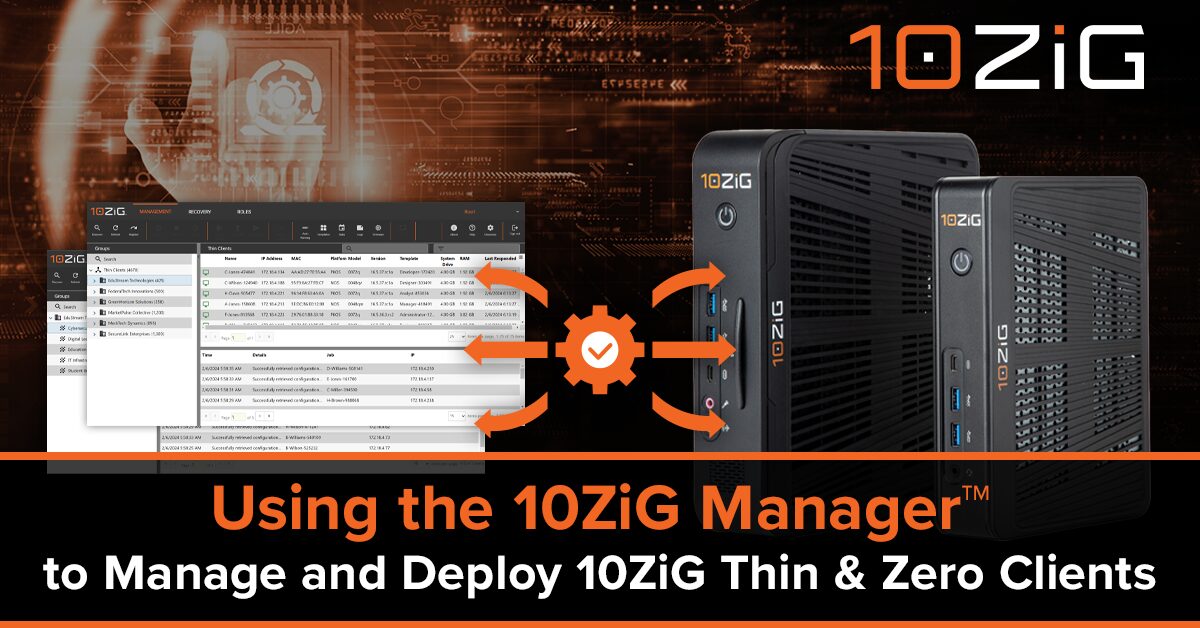
Using the 10ZiG Managerā„¢ to Manage and Deploy 10ZiG Thin & Zero Clients

Using the 10ZiG Managerā„¢ to Manage and Deploy 10ZiG Thin & Zero Clients

First published by Dominiek Verham, November 13th, 2025 – Dominiek Verham is a Microsoft Cloud consultant, helping customers to improve desktop experiences and transitioning to modern solutions. He loves to be a part of the community and share his knowledge on his personal blog, the Windows 365 community and you can find him on stage at various IT events speaking about EUC. In 2024 he wrote a book together with Johan Vanneuville called Securing Cloud PCs and Azure Virtual Desktop. Dominiek is very honored to be a Windows 365 MVP and Nerdio NVP since 2022 and also an Azure Virtual Desktop MVP since 2024.

What’s up, everyone!

In the upcoming mini-series I’d like to take you back to a presentation I delivered with Niklas Tinner at the Workplace Ninja Summit. In this session we compared Windows 365 Link with a Windows 365 Boot device. We finished up with an interactive session with the attendees and one of questions we prepared was: Which solution would you use?

One attendee replied: a thin client!

Windows 365 Link and Boot are great Microsoft options, but you can use a lot of other devices if you want to. So let’s do another comparison between Windows 365 Link, Windows 365 Boot and 10ZiG zero clients.

Mini-series overview

  1. Using 10ZiG Manager to manage zero and thin clients

I want to thank my friends at 10ZiG for sending me a thin and zero client to work with on this post!

10ZiG Manager Prerequisites

The following are prerequisites if you want to follow along:

  • 10ZiG Manager is a free to use solution to manage 10ZiG devices. I will use the upcoming v6 and run it in a Hyper-V VM. Would you like to try the new v6 as well? Reach out to 10ZiG and they can get you access to an OVA file which you can convert to VHDX if you prefer Hyper-V.
  • A 10ZiG zero client running the NOS operating system.
  • A 10ZiG thin client running the PeakOS operating system.

I will use a 10ZiG 7048qm zero client for this demo and I will update it to the latest firmware so I can show the updated GUI!

10ZiG Manager: one console to rule them all!

Thin and zero clients can be managed locally which is fine for local support actions. 10ZiG helps you out with the 10ZiG Manager which is a free tool that you can download on their website.

At the time of writing you can download version 5.4.2.0 as an executable that you can install on Windows Server operating systems. Please note that you cannot and should not install apps like this on Domain Controllers.

Once installed you can use your favorite browser to connect to the web app and you will set up your first account. This account will be part of the Administrator role and will have full control. You have the option to add additional custom roles or use the other built-in roles to implement RBAC into the environment.

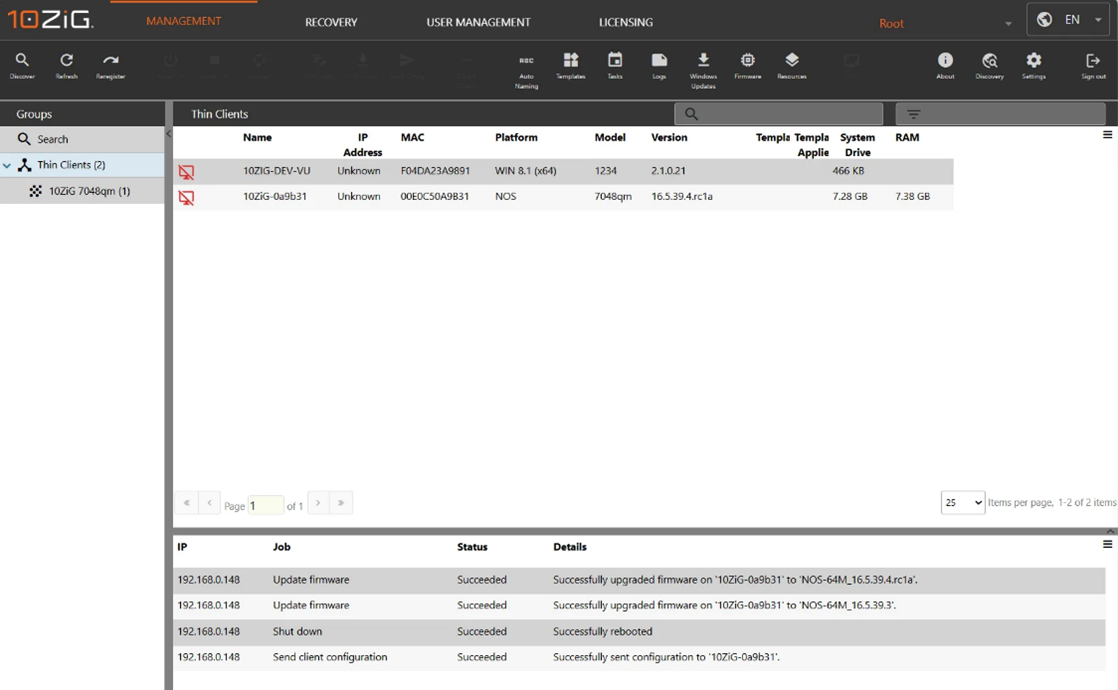
As mentioned in the introduction text, 10ZiG has been kind enough to give me access to the upcoming version 6 of 10ZiG Manager. So here is a special sneak peek on the new v6 GUI of 10ZiG Manager:

The top bar allows you to switch between management options:

  • Management gives an overview of all the available devices in the network and all of the configuration options.
  • Recovery is used to send power on / power off commands to your devices and you can enable or disable PXE.
  • User management allows you to manage exiting and create custom roles and add or remove new users. Do you want to integrate with Entra ID? 10ZiG has got your back. Just click the Configure Entra ID button in the ribbon.
  • Licensing gives an overview of your licenses if you have any.
  • Let’s continue with updating the 7048qm zero client to the newest firmware that contains the new Windows app gui using 10ZiG Manager.

Updating to the latest 10ZiG firmware

The 7048qm zero client runs NOS as the operating system. It’s more a firmware-based solution then a full operating system.

There are a couple of ways to update the device:

  • From the 10ZiG Manager, select the device and update the device individually.
  • From the 10ZiG Manager, create a scheduled task and update the firmware for multiple devices in bulk.
  • From the 10ZiG Manager, create a group with auto-population filters. Set and apply the firmware to the group configuration to automatically update the firmware of members devices.
  • Update the device from a local USB stick. Just copy the .tar file to the USB stick, on the local device, go to settings, allow local update from USB stick. Plug your USB stick in and watch the magic happen.

In this demo I will update the device using the 10ZiG Manager.

The new firmware has a new and improved user interface. So, let’s take a quick look at what the ā€˜old’ firmware and user experience look like:

Updating a single device

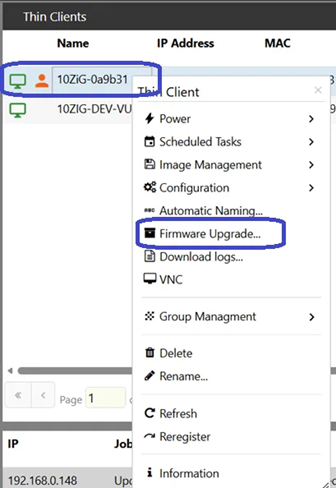
Let’s find out how to update a single device at a time. From the 10ZiG Manager console, select the device you want to update and select Firmware Upgrade… in the context menu.

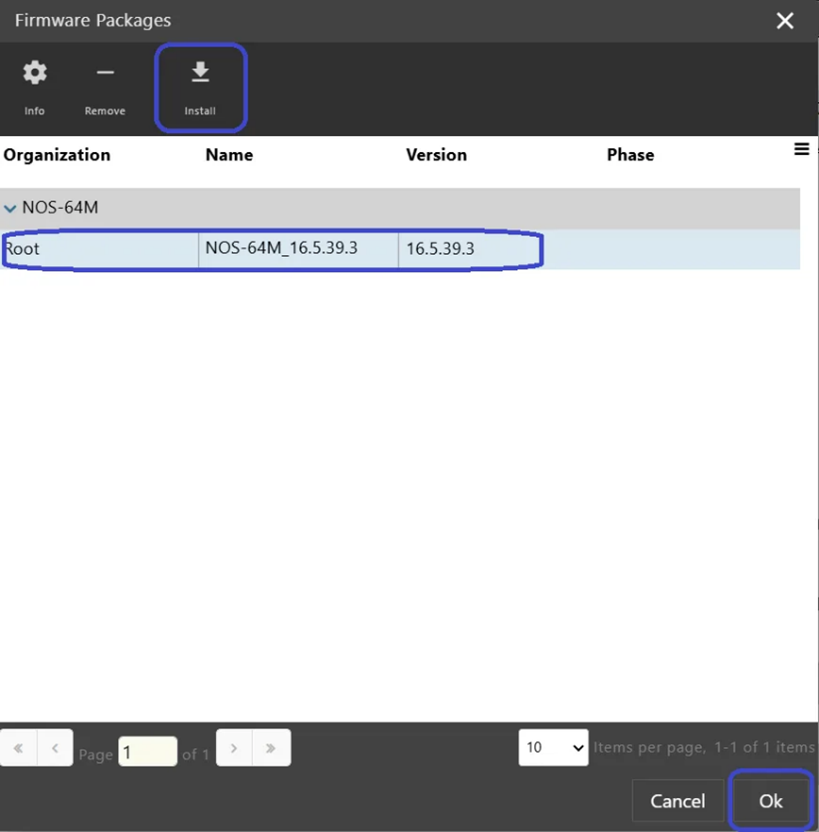
This will bring up the firmware packages window. If you just installed 10ZiG Manager, you will not see any firmware available. Instead you need to download the firmware from the 10ZiG website and click the install button.

Click the Choose File button and navigate to the folder where the firmware is saved. Upload that firmware and wait until the upload completes.

You will see the firmware in the overview once the upload completes. Now select that firmware and notice that the OK button in the lower right corner becomes available. Click OK.

The task pane will keep you informed of the status of the upgrade. In my case it took a bit of time before the upgrade was completed successfully:

Updating devices using a scheduled task

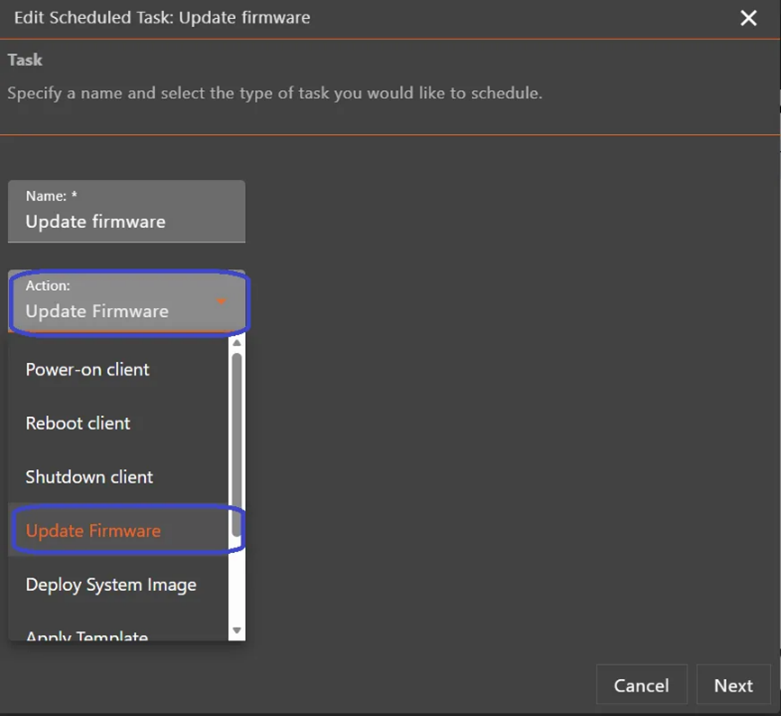
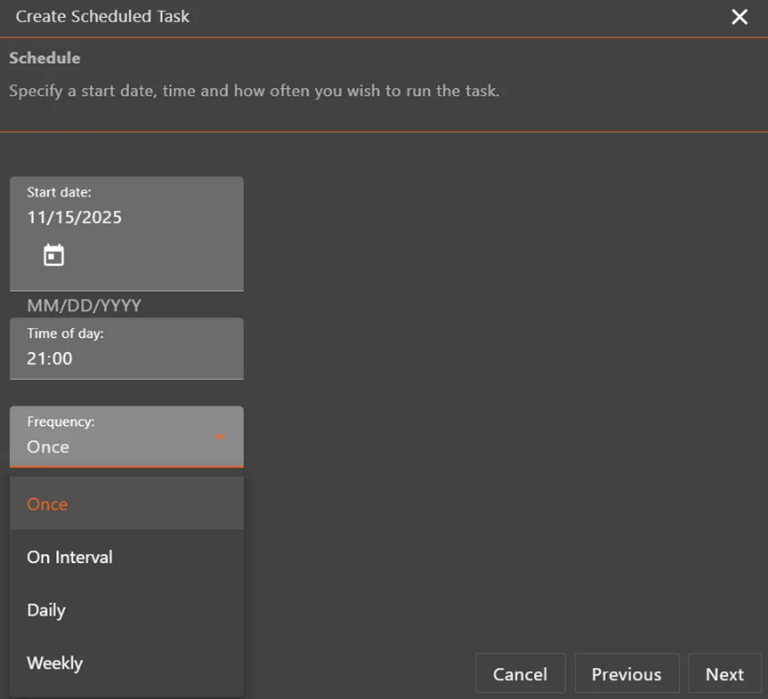
Alternatively, you can create a scheduled task to upgrade multiple devices in bulk. Select the desired devices, from the contextmenu select Scheduled Tasks, Add…

Give the scheduled task a name and select the desired action:

Then it’s time to select the firmware and click the OK button in the lower right corner.

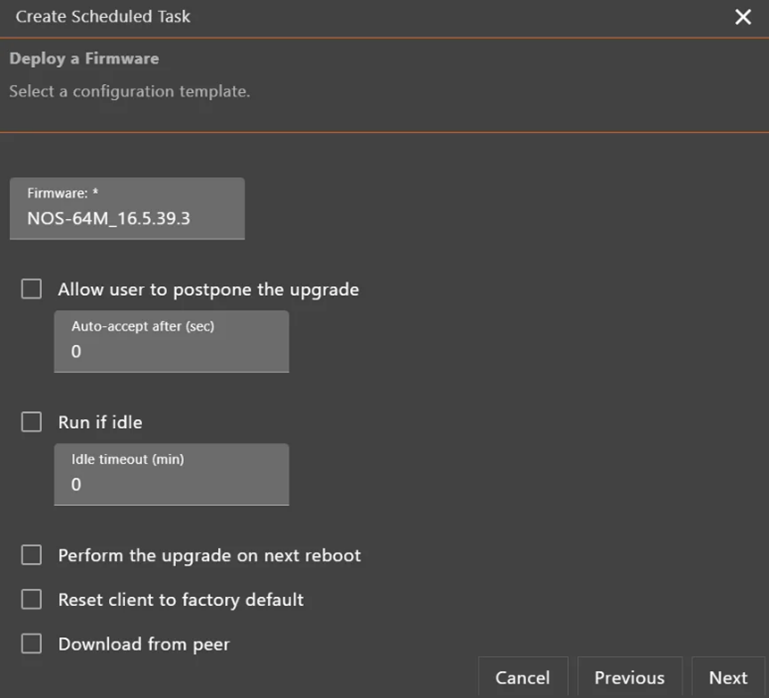
The next step has some specific options related to the deploy a firmware template:

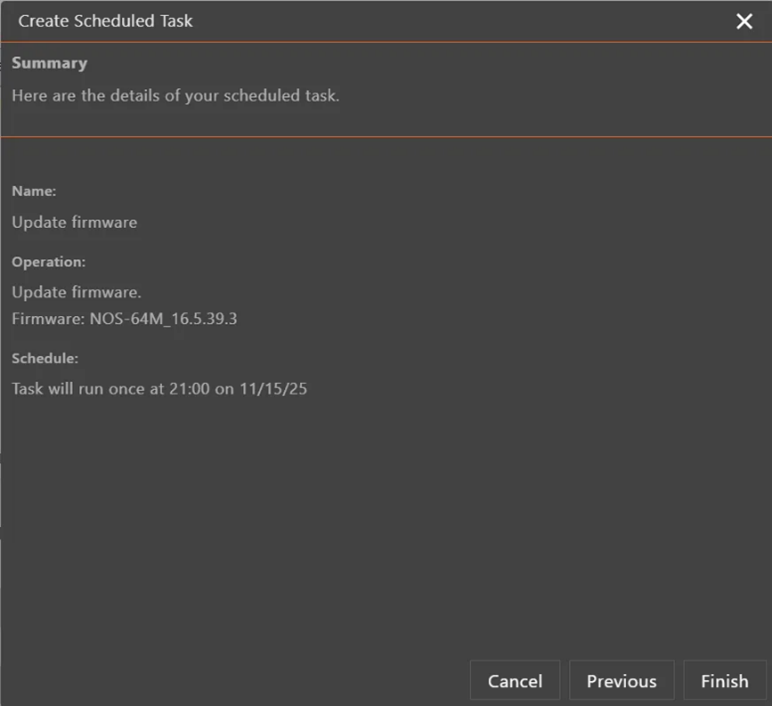
Select the time and date you want the scheduled task to run:

Now it’s time to admire your awesome work and click the Finish button.

The job is now created and will run at the specified date and time. You can monitor the status of the task and even change the settings if you click on the Tasks tile in the ribbon.

Automatically update devices using a dynamic group

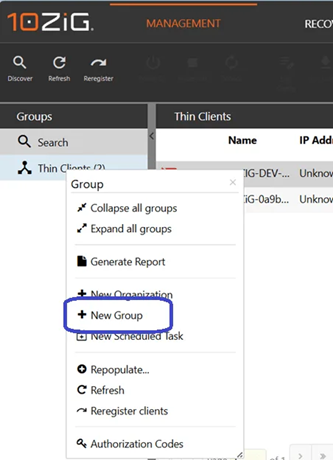
You can make your life even more easy by creating a group in the 10ZiG Manager and apply client configuration settings to automatically update the firmware for new devices. Rightclick in the group window and select + New group.

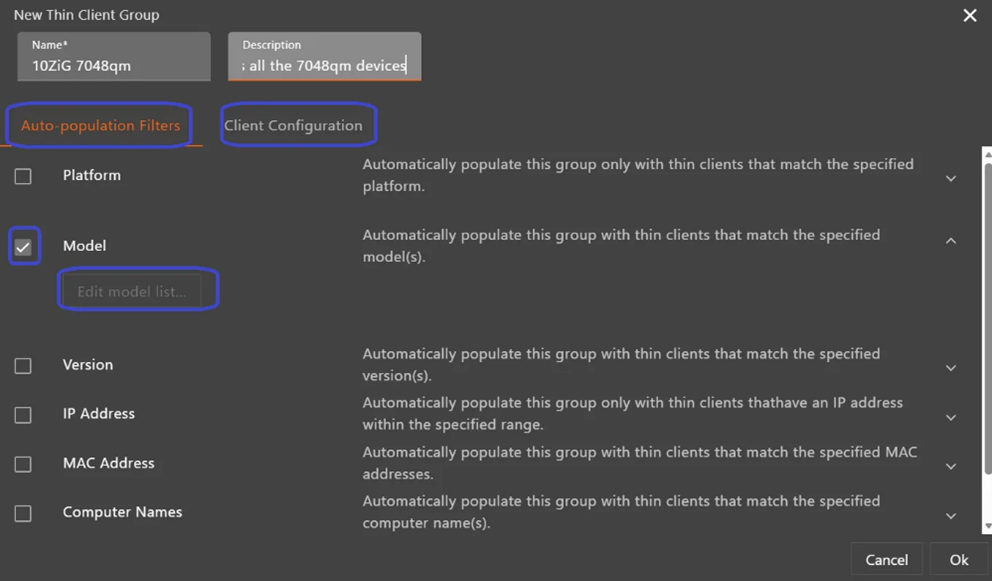
There are a couple of things to look for in the upcoming screenshot.

  • Give the new group a name and description
  • Notice there are two tabs:
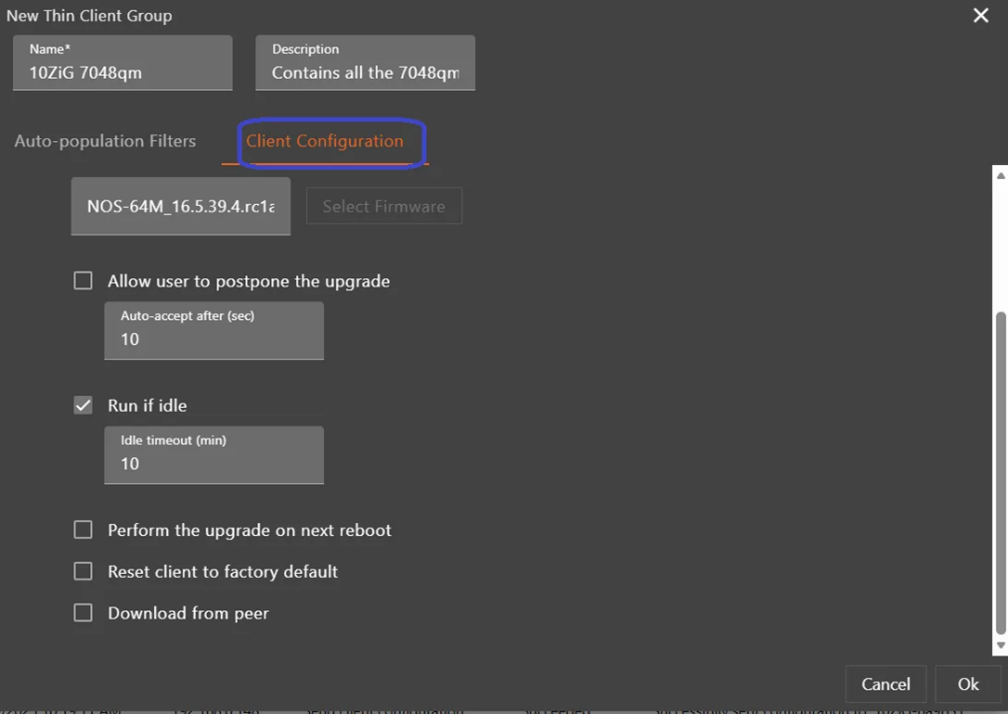
    • Auto-population filters are used to group devices based on properties, like the model. Just check the box and enter the model.
    • Client configuration gives the option to send client configuration to the devices, auto-name clients and automatically update the firmware.

Let’s start with the auto-population filters. I used the model and added the model name (7048qm).

Next up is the client configuration. Select the auto-update firmware option, select the desired firmware for the devices and optionally select the user experience:

  • Allow the user to postpone the update
  • Run if the device is idle
  • Perform the update automatically at next reboot
  • Reset the client to factory defaults
  • Download the firmware from a peer

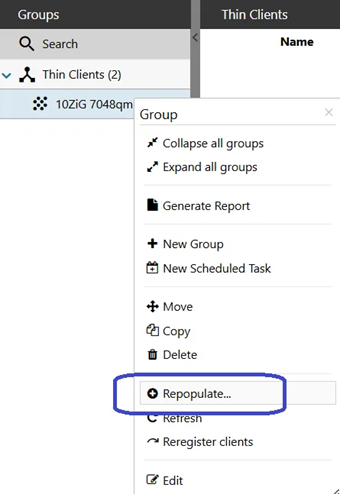
Admire your awesome work and click the OK button to create the group. The new group will appear in the Groups window but chances are that no devices are listed in the group yet. If so, rightclick the newly created group and select + Repopulate…

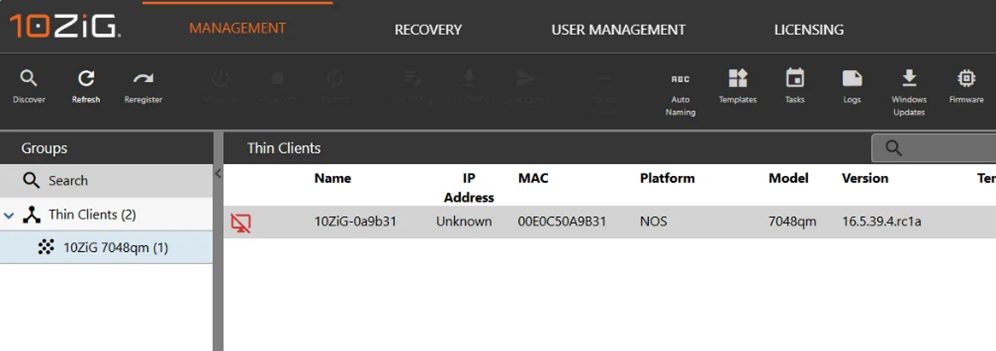
You should now see the devices in the group and they will update their firmware automatically according to the settings you selected earlier:

If you can’t see the devices after the Repopulate action, then I would advise to doublecheck the group settings (rightclick and select edit).

We have successfully upgraded the firmware of our zero client. Let’s see the new GUI in action!

The new and improved 10ZiG user experience

Microsoft raised the bar as far as user experience goes with the Windows app. It allows you to connect to your cloud-based desktops in Windows 365 and Azure Virtual Desktop and you can connect to your corporate apps using Cloud Apps and RemoteApp. All of that including self-service options and device options like restart and point-in-time restore.

The ā€˜old’ GUI works but simply does not come close to the user experience of the Windows app.

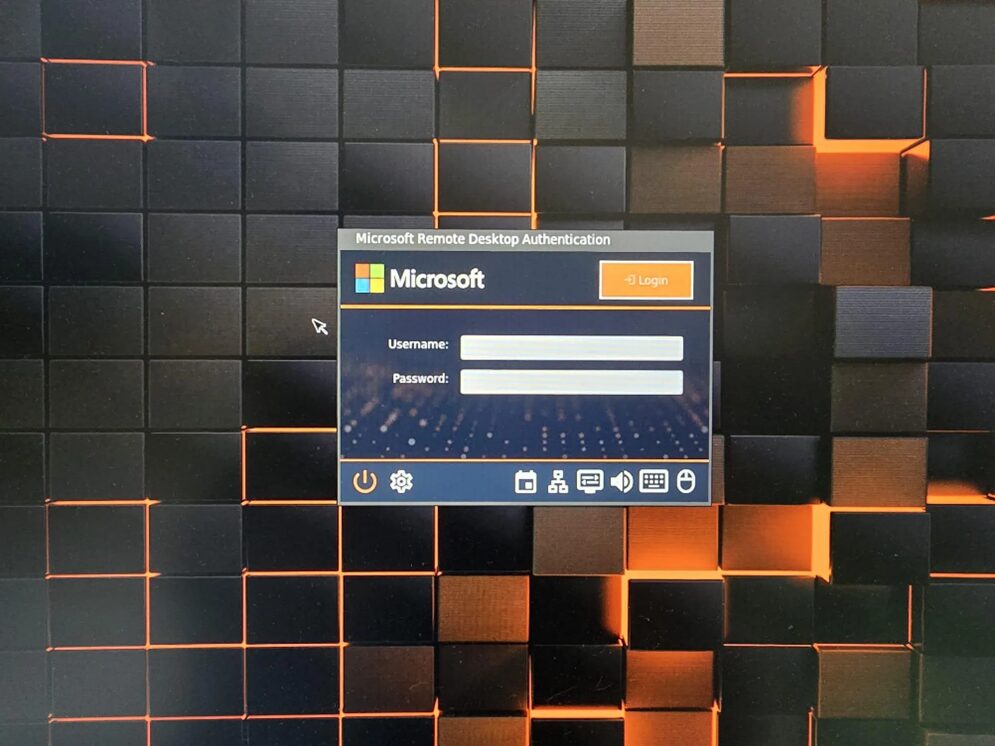
Let’s find out what the new GUI looks like after updating to the new firmware:

We can see that the wallpaper is updated but so far not a lot of difference… or is there?

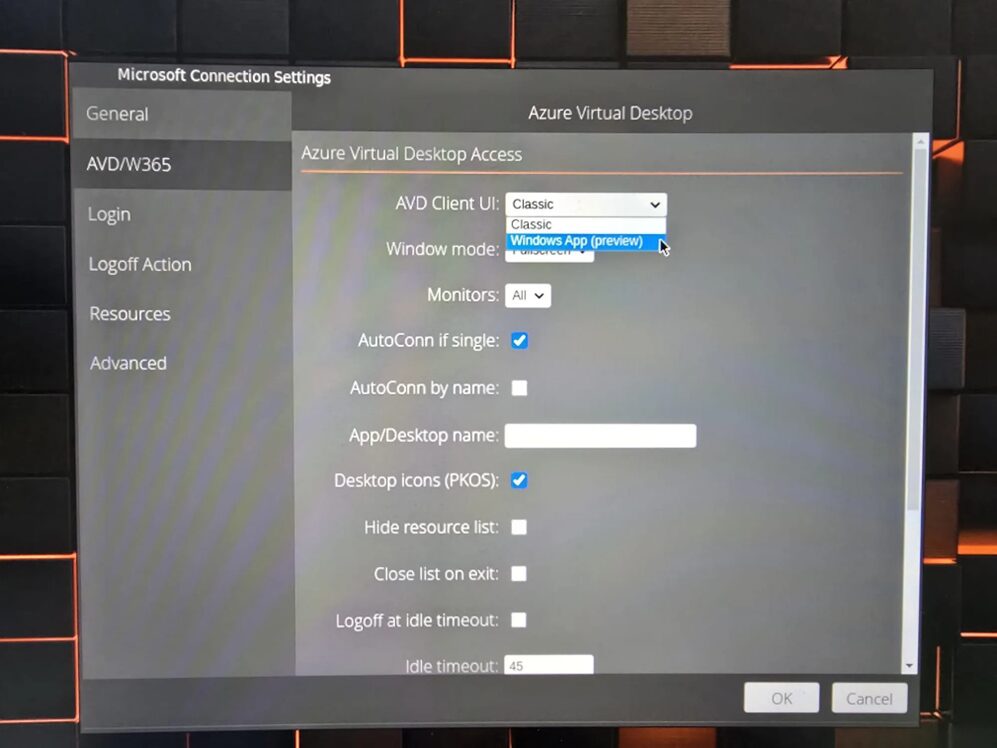
Actually, there is but we still need to turn that experience on. Find the gear icon in the bar below which will open up the Control Panel.

Click on Microsoft Remote Desktop. We can now define the connection settings and user experience.

  • First go to AVD/W365 and select Windows App (preview) as the AVD Client UI.
  • If you are testing with Windows 365 Cloud PCs I would recommend to disable Autocon if single. This way the client signs into the workspace and retrieves all assigned desktops. Since you are running Cloud PCs, you will now have access to self-service options!

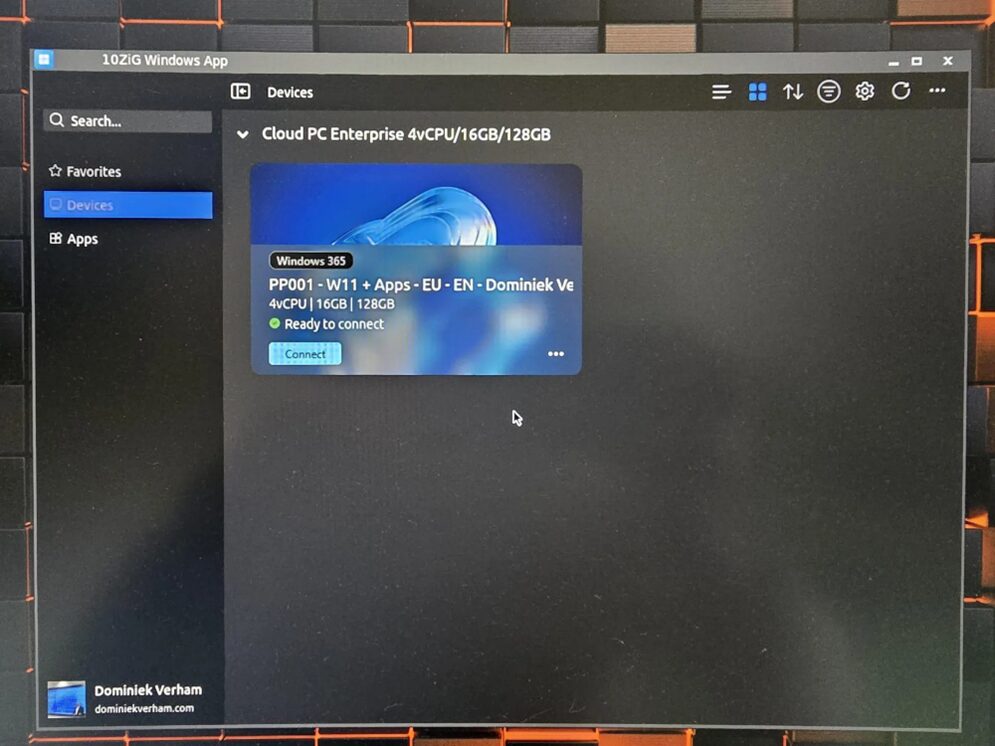
Speaking about the new Windows App experience, this is looking very familiar already!

We now have access to our favorites, devices and apps. And my Cloud PC is of course under devices.

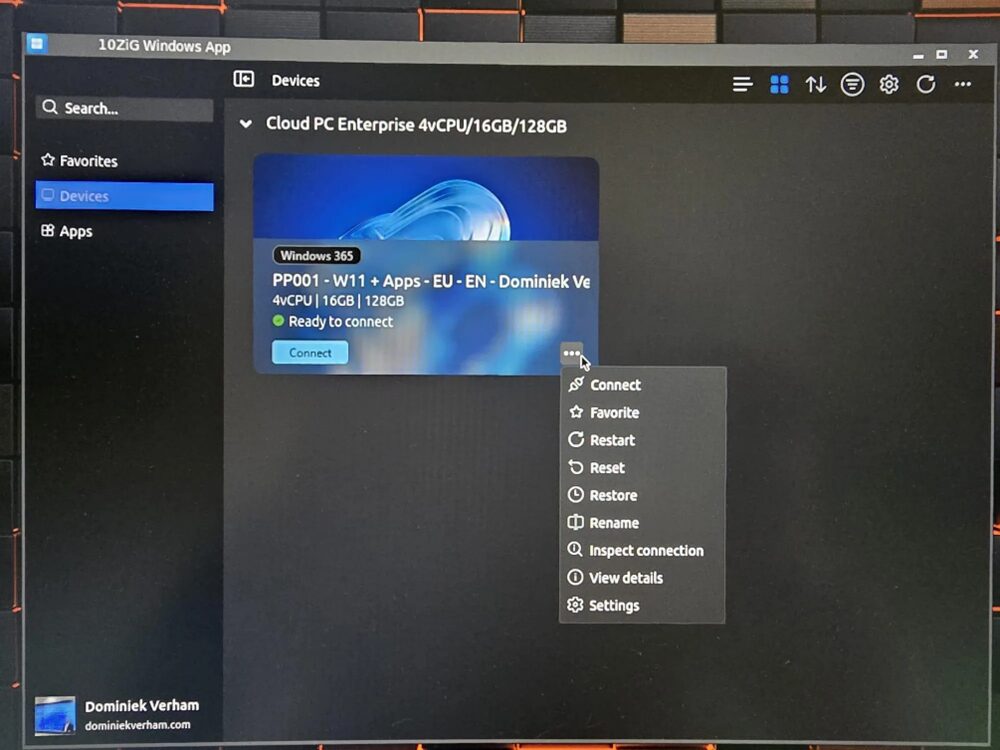
Clicking the three dots will give you access to most of the self service options that Windows 365 has to offer. You now have the ability to restart your Cloud PC or use point-in-time restore to restore your Cloud PC to an earlier time!

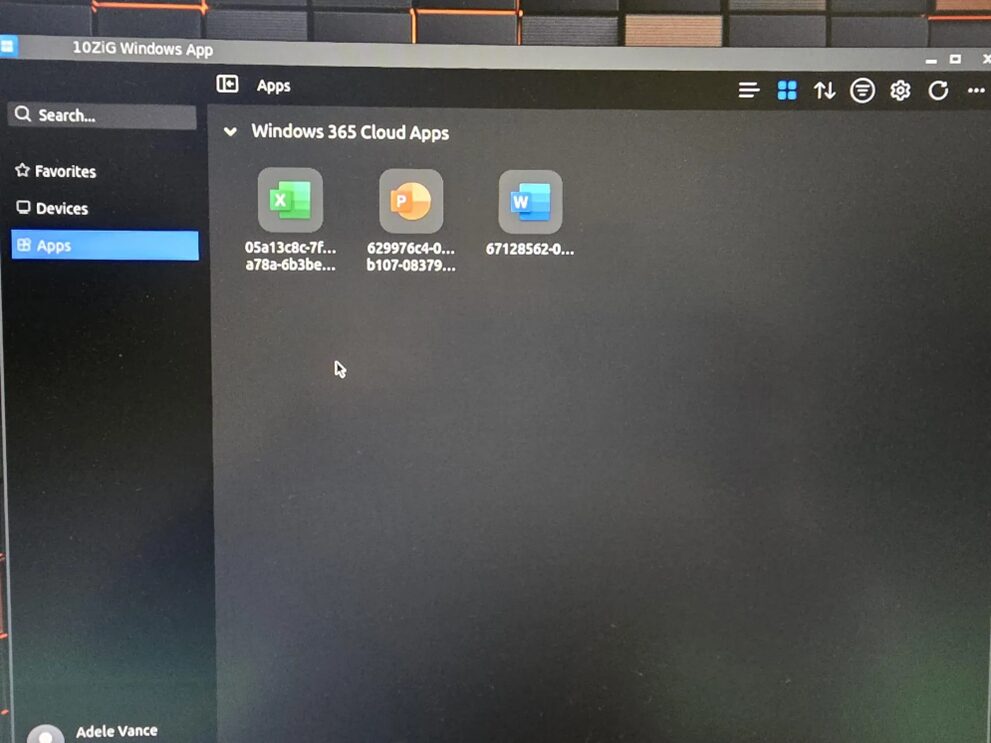
The Apps section will show you all the apps that are assigned to you.

That got me curious! I have been testing with Cloud Apps. Does this new experience also support Cloud Apps? Let’s find out!

Even Cloud Apps are picked up and showed in the new UI. Just the name doesn’t show correctly at this point. That is something 10ZiG is actively working on!

I’ve started PowerPoint and that works like a charm. The connection bar however still shows the incorrect name.

What about working with External Identities?

Signing in is just the same as signing in with the Windows app. You do get all the same bells and whistles which means you can also use this updated zero client for scenarios where companies use External Identities (more info on this blog). The Sign in to an organization option is also available from the zero client..

10ZiG Resources

I used the following resources for this post:

Zero Client – 10ZiG 7048q Endpoint with Free Central Management

10ZiG Manager: Central Management Software for Endpoints

10ZiG Zero Client: Endpoint Hardware for VDI and DaaS

Beyond Legacy Horizon PCoIP

Beyond Legacy Horizon PCoIP

Preparing for Omnissa Horizon’s PCoIP Retirement and Transitioning to Blast Extreme or PCoIP Ultra with 10ZiG.

As Omnissa Horizon approaches end-of-life for the legacy PCoIP protocol, Horizon customers face a pivotal moment in defining their future remoting strategy. With Horizon now supporting the next-generation PCoIP Ultra, and Blast Extreme continuing to evolve as a core Omnissa protocol, organizations have two powerful options to ensure high-performance, secure, and future-proof virtual desktop experiences.

Don’t get caught unprepared—join 10ZiG to future-proof your Horizon deployment strategy with Blast Extreme and PCoIP Ultra

Join 10ZiG for a technical update that explores what the PCoIP EOL means for your Horizon environment and how to plan a smooth, secure migration to either Blast Extreme or PCoIP Ultra. We’ll walk through key EOL milestones, support timelines, and critical technical considerations to help you choose the best protocol for your specific workloads and user scenarios.

Learn how Blast Extreme excels in scalability, manageability, and broad platform integration—while PCoIP Ultra leverages advanced codecs and GPU-optimized architecture for exceptional performance in high-fidelity and graphics-intensive environments. You’ll also see how 10ZiG’s Modernized and Trusted Zero Clients are purpose-built to deliver seamless experiences with both protocols, offering the latest in zero-trust security principles and centralized management.

With live technical demos, migration best practices, and practical guidance, this session will help you confidently prepare for 2026 and beyond—no matter which remoting path you choose.

Kevin Greenway, 10ZiG Chief Technology Officer, and Kristina De Nike, Omnissa Director of Product Management, will be your hosts!

Kevin Greenway

10ZiG Chief Technology Officer

Kristina De Nike

Omnissa Director of Product Management

Facing Another Endpoint OS Software Upgrade Without the Right Hardware Storage or Subscription License?

Facing Another Endpoint OS Software Upgrade Without the Right Hardware Storage or Subscription License?

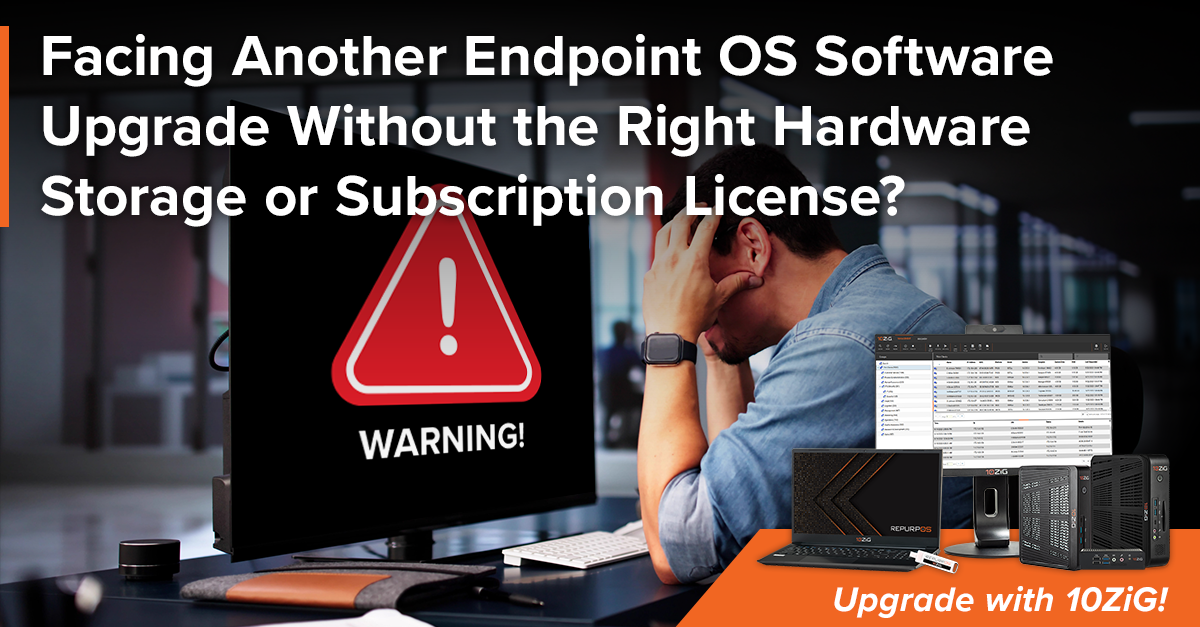
Don’t get trapped by 8GB minimum storage or other requirements and potential expenses for software updates – break free with 10ZiG!Ā 

Chances are that you’re not the only one these days facing an OS software upgrade without meeting related vendor requirements. And you may also be considering that the year is ending fast – nearly at a close! You may not be on a subscription model for a required upgrade and may need to purchase one. Or maybe you’re just on a different licensing model and you may need to pay to migrate or upgrade the subscription. Perhaps your devices do not meet required hardware or firmware prerequisites. You may also have to face the fact that existing numerous profiles and settings from your current OS may not be directly reusable. In addition to all of this, you may have to factor in that some upgrade features may indeed differ, and custom partitions or unsupported hardware could actually block the upgrade.

Repurpose 4GB Hardware with 10ZiG RepurpOSā„¢ while planning a POC for future hardware – 8GB and up!

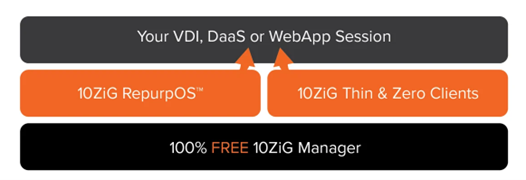
If you’re dealing with a required OS software upgrade with a set minimum at 8GB storage, and you’ve only got 4GB storage, 10ZiG can easily assist with our no-hassle repurposing software, as well as 8GB-supported hardware for when you have the time and budget for selecting and purchasing. Our single-vendor, mixed-device environment approach repurposes existing hardware, offers new hardware, and successfully manages everything together with our management software, the 10ZiG Managerā„¢.

10ZiG OS – RepurpOSā„¢ – for 4GB Endpoint Storage Devices

You can repurpose existing hardware with RepurpOSā„¢, 10ZiG’s secure, Linux-based Thin Client OS transformative software designed for VDI, DaaS, and Web Apps, with a 4GB storage minimum. 10ZiG RepurpOSā„¢ Software is designed so that anyone can easily implement the software onto a computer, laptop, or even an outdated third-party thin client with no hassle. Even older clients with 4GB storage minimum. The software not only transforms an existing device to run a purpose-built OS designed for VDI, DaaS and Web Apps consumption, it also includes centralized management to deploy and update on its own, ensuring that you are never left with complex management issues such as juggling outdated brokers, plugins, or security vulnerabilities.Ā 

RepurpOSā„¢ Requirements including 4GB Minimum Storage

  • PC, Laptop, or Thin Client
  • 2GB RAM Minimum (4GB recommended)
  • 4GB Storage Minimum (not 8GB!)
  • Ethernet or Wireless Network Interface
  • X86-Based Processor (Intel/AMD)
  • Intel or AMD-Based Graphics

Modernized Thin & Zero Client Endpoint Hardware with 8GB Storage Minimu

10ZiG RepurpOSā„¢ can optimize your hardware with top security features, cost savings, centralized management, and ā€˜the 10ZiG repurposing difference’ – no hassle! Devices can be managed over the internet, not requiring additional access gateways or licenses. You can easily run software live, install in minutes, and configure without issue. But, if you find you are ready to make the switch to 8GB+, 10ZiG is also your one-stop-shop, single-vendor provider for both software and hardware, so we’ve got you covered for this next round of endpoints.

Modernized Thin & Zero Client Hardware with Free Management

As a leading Thin & Zero Client hardware and software provider, 10ZiG delivers a modernized and secure user experience for VDI, DaaS, or WebApps. With 22+ years in the Thin Client endpoint market, plus no-hassle repurposing software and easy-to-use free management, 10ZiG is your perfect single-vendor strategy.

  • Secure, Flexible, Managed Endpoints
  • Standardized Endpoint OS
  • Free Management Software
  • Local support included
  • Wide range of TAA Compliant form factors
    • Traditional Desktop
    • Thin Client Laptops
    • All-In-Ones
  • 4GB, 8GB, and up!
  • Fiber, wireless support, quad screen, and more

Plus, with our ever-growing 10ZiG ecosystem of technology partners to keep our product cutting-edge and flexible by incorporating leading connection brokers like Omnissa, Microsoft, Citrix, and more, you’ll be hard-pressed to find a more inclusive single-vendor approach!

So really, no matter what GBs you’re currently working with, 10ZiG alternative software and hardware solutions can break you free from looming, concerning, daunting, and possibly costly situations when attempting to change over into an end-of-year software OS upgrade.Ā 

No-Hassle Repurposing Download

Request a Free Device Demo

For more information, please reach out toĀ [email protected]Ā (USA) orĀ [email protected]Ā (EMEA)

California Thin Clients | Are these endpoints still helping today’s modern organizations and entities?

California Thin Clients | Are these endpoints still helping today’s modern organizations and entities?

Thin Client Endpoints for California in Today’s Modern WorldĀ 

Are thin client endpoints still helping today’s modern organizations and entities in California?Ā  The short answer is yes. The longer answer is that thin, and zero clients, have never stopped helping and supporting the VDI/DaaS compute environments of California’s organizations, companies, entities, etc.Ā  In fact, some might even say they were a bit ahead of their time! Thin, and zero clients, that is…

Thin Client Endpoint Advantages for California, United StatesĀ 

Now, if you’re a Californian and have made your way to this linked 2025 blog post, you are most likely already aware of the key basics of thin client endpoint advantages like lower hardware cost, longer lifecycles, reduced energy consumption, lower carbon footprint, simplified and centralized management, enhanced security, minimal attack surface, compliance-readiness, flexibility and scalability, and so on and so on…

Let’s also mention here the fact that in the grand scheme of things, thin clients have not been around really all that long. Well, okay, they have been more ā€˜mainstream’ since the 2000s because of bandwidth improvement, virtualization – like VMware & Microsoft Terminal Services maturation, and more affordability in hardware costs. What’s more, thin clients are not going anywhere, anytime soon.Ā 

10ZiG Thin Clients Endpoints for California Modern & Green WorkforcesĀ 

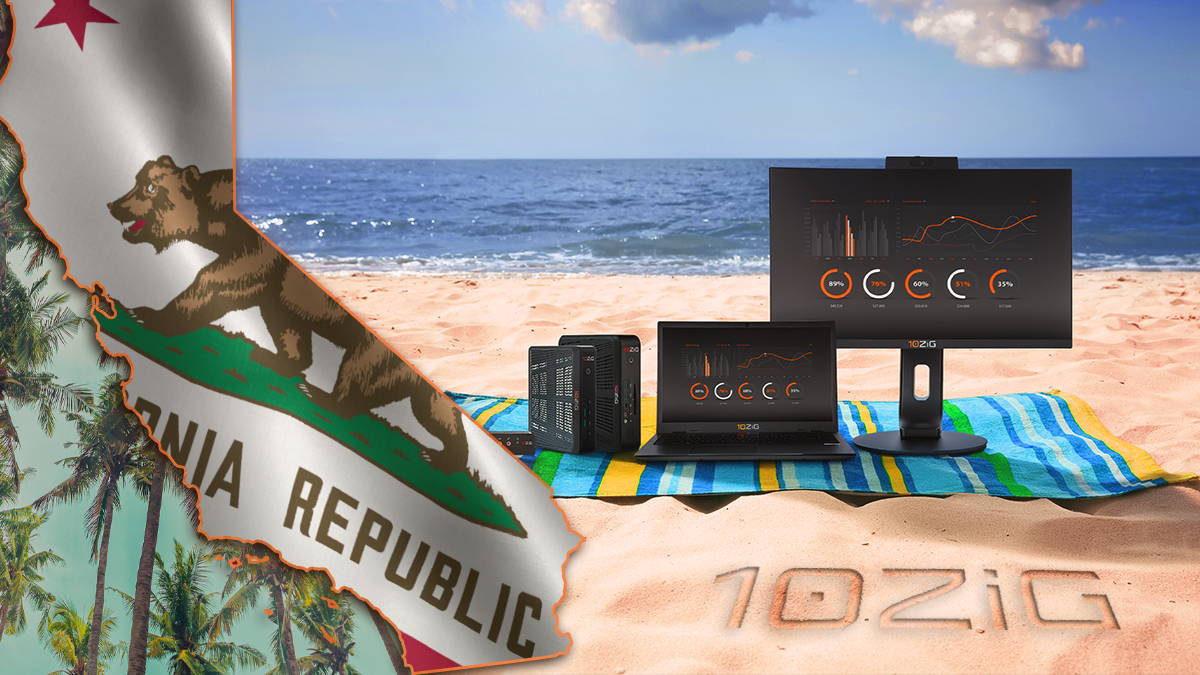
It’s not surprising that California would have a good bit of its companies leveraging remote or hybrid work styles with multiple office locations across states and/or even countries. This is where 10ZiG Managerā„¢ centralized endpoint logic can simplify management and deployment of hundreds to thousands of distributed devices. Plus, office spaces in cities like San Francisco and Los Angeles often face high overhead and power costs, so 10ZiG Thin Clients help to reduce heat, device footprint, and infrastructure cooling loads.Ā 

A leading state of energy efficiency and emissions reduction regulation, California IT Admins also like the idea that thin client endpoints use far less power and help to meet corporate sustainability goals. Extending device lifecycles (sustainability) and reducing refresh frequency is also helpful to California. Thin clients often last longer than traditional PCs. 10ZiG RepurpOSā„¢ Repurposing Software recycles existing hardware into a secure Linux-based thin client OS while IT prepares for future hardware replacement, fully supporting green-based initiatives.Ā 

About 10ZiG Technology for California and West Coast

10ZiG Technology is a leading Thin & Zero Client hardware and software provider delivering a modernized and secure user experience for VDI, DaaS, or Web-based environments. With 21+ years in the Thin Client endpoint market, no-hassle repurposing software, and easy-to-use free management, 10ZiG is the perfect Single-Vendor Strategy.

With local support included and a wide range of TAA Compliant options from traditional desktop form factor, Thin Client laptops, and All-In-Ones, along with an array of unique features including Fiber, Wireless support, quad screen, and more, 10ZiG is the secure, managed solution for today’s diverse IT requirements.Ā 

Our ever-growing 10ZiG ecosystem of technology partners helps keep 10ZiG product cutting-edge and flexible by incorporating leading connection brokers like Omnissa, Microsoft, Citrix, and more.Ā 

Find your solution | California Free Demo

10ZiG Announces 10ZiG Manager for Linux, Delivers More Secure, Cost-Efficient and Simplified Endpoint Management

10ZiG Announces 10ZiG Manager for Linux, Delivers More Secure, Cost-Efficient and Simplified Endpoint Management

10ZiG Announces 10ZiG Manager for Linux, Delivers More Secure, Cost-Efficient and Simplified Endpoint Management

Next-generation centralized management solution helps organizations cut costs, strengthen security, and streamline deployment with Linux freedom.

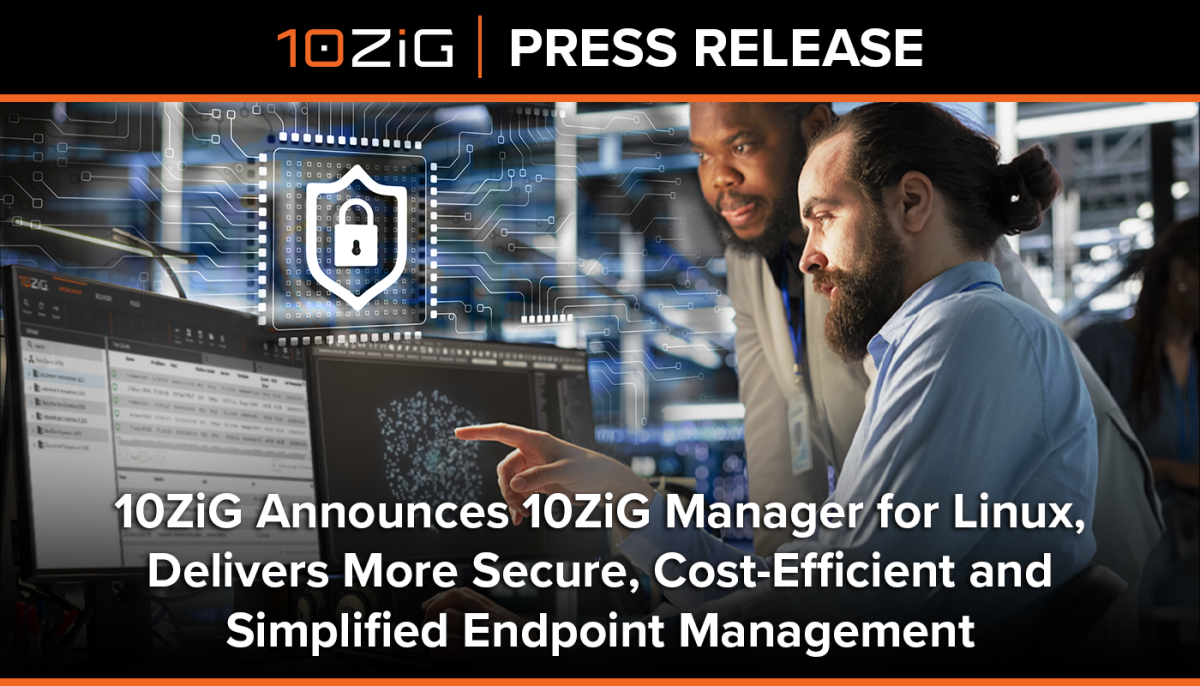
PHOENIX – October 28, 2025 – 10ZiGĀ® Technology, a leading provider of thin and zero client hardware and software solutions for VDI, DaaS, and web app environments, today announced 10ZiG Managerā„¢ v6 for Linux, its next-generation centralized management platform. Now built entirely on a Linux-based virtual appliance, 10ZiG Manager v6 represents a significant evolution from its Windows-based predecessor, providing customers with stronger security, simplified deployment, and lower total cost of ownership.

Unlike competing solutions that require costly subscriptions or license add-ons, 10ZiG Manager v6 will remain completely free and will be included with every 10ZiG thin and zero client and RepurpOSā„¢ license.

ā€œWith 10ZiG Manager v6, we’ve taken a huge step forward in how organizations can manage their endpoints,ā€ said Kevin Greenway, CTO, 10ZiG Technology. ā€œBy moving to a Linux-based foundation, we’ve eliminated unnecessary complexity, reduced operating costs, and enhanced security. Most importantly, we’ve delivered this upgrade while staying true to our promise: 10ZiG Manager is still free, with no hidden costs, unlike competing solutions. This release is not just an update, it’s the next generation of endpoint management.ā€

Ā Lightweight and self-contained

The centerpiece of the new 10ZiG Manager release is its new Linux-based architecture, which delivers a lightweight, self-contained, and highly secure deployment model. By decoupling completely from Windows, organizations can run 10ZiG Manager on lower-overhead virtual machines without the expense of Windows Server licenses. This not only reduces total cost of ownership but also helps eliminate Windows-related vulnerabilities, patching cycles, and administrative overhead. For Linux-centric IT teams, it means a solution that aligns seamlessly with open standards, accelerates performance, and provides more flexibility in how and where 10ZiG Manager is deployed. Current support includes VMware and Nutanix environments, with additional hypervisor support on the roadmap.

Faster performance, improved scalability and greater security

A modernized web framework powers the brand-new 10ZiG Manager v6 Web Console. This redesign delivers faster performance, improved scalability, and an intuitive interface that enhances usability while retaining the simplicity administrators expect from 10ZiG solutions.

Ā With v6, enterprises can also take advantage of advanced multitenancy support and granular organizational views. This enables greater security, more precise access management, and easier delegation of administrative responsibilities in large or complex environments.

Additional new and enhanced features include:

  • Microsoft Entra ID (AAD) integration for modern identity management
  • Enhanced notifications with thin client job success/failure alerts via SMTP
  • Secure Connector and Secure Authorization for stronger cloud-based access
  • Advanced configuration management for Linux clients, including retrieval, editing, and push of settings
  • Remote shadowing via VNC, securely tunneled through Secure Connector
  • Comprehensive reporting and logging, with downloadable endpoint and manager logs
  • Role-Based Access Control (RBAC) with user roles, permissions, and full audit logs
  • Multilanguage support for global deployments

Customer-centric and cost-saving

By decoupling from Windows, 10ZiG Manager v6 offers a smaller footprint, streamlined updates, and fewer dependencies. This shift enables customers to deploy management servers on lightweight virtual machines without the need for Windows Server licensing—cutting costs while improving operational efficiency.

At the same time, 10ZiG continues to differentiate itself in the market by offering 10ZiG Manager completely free, unlike competitors who increasingly require flat fees or optional subscriptions for endpoint management.

10ZiG Manager v6 is available today for public preview and will be included free of charge upon general availability with all 10ZiG thin and zero clients and RepurpOS licenses. Existing 10ZiG Manager v5 users will continue to receive support, ensuring customers have the flexibility to adopt v6 at their own pace.

About 10ZiG Technology

10ZiG Technology is a leading Thin & Zero Client hardware and software provider delivering a modernized and secure user experience for VDI, DaaS, or Web-based environments. With 20+ years in the Thin Client endpoint market, no-hassle repurposing software, and easy-to-use free management, 10ZiG is the perfect Single-Vendor Strategy. With local support included and a wide range of TAA Compliant options from traditional desktop form factor, Thin Client laptops, and All-In-Ones, along with an array of unique features including Fiber, Wireless support, quad screen, and more, 10ZiG is the secure, managed solution for today’s diverse IT requirements. Our ever-growing 10ZiG ecosystem of technology partners helps keep 10ZiG product cutting-edge and flexible by incorporating leading connection brokers like Omnissa, Microsoft, Citrix, and more. Find your solution at www.10zig.com.

Corporate Headquarters, US

10ZiG Technology Inc.

2043 West Lone Cactus Drive

Phoenix, AZ 85027, USA

+1 (866) 865-5250 | Email: [email protected] | Web: www.10ZiG.com

EMEA Headquarters

10ZiG Technology Ltd.

7 Highcliffe Road

Leicester LE5 1TY, UK

+44 (0) 116 2148650 | Email: [email protected] | Web: www.10ZiG.com

DACH Headquarters

10ZiG Technology GmbH

Nymphenburger Straße 3b

80335 München

0160 92472602 | Email: [email protected] | Web: www.10ZiG.de

Ā 

Stratodesk is GONE! What next?

Stratodesk is GONE! What next?

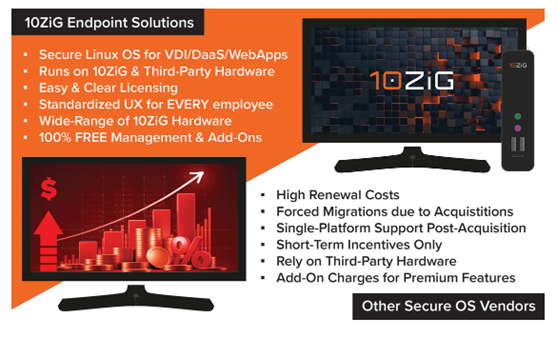
Stratodesk NoTouch OS users facing product EOL and/or others that are simply dealing with outrageous subscription renewal quotes due to recent market acquisitions are turning to 10ZiG for affordable renewal subscriptions. We can get those unattainable costs down with easy migration, helping to keep things going smoothly and business as usual!

10ZiG Single-Vendor Hardware & Software Solutions for Stratodesk Survivors

10ZiG RepurpOSā„¢ (Repurposing Software) Secure Linux OS for VDI, DaaS, and WebApps can be a fraction of the cost that you are being forced into – with easy and clear licensing, standardized UX for employees – and runsĀ seamlessly on 10ZiG &Ā Third-Party Hardware with 100% FREE Management. Plus, if and when you need to talk hardware, 10ZiG’s Single-Vendor Hardware and Software approach has you covered, offering a full lineup of Modernized Thin & Zero Client endpoints from traditional standalone to laptop to all-in-one, task workers to power users.

Stratodesk Alternative > Don’t get Forced into Linux Endpoint OS that you did not Choose!

You should not have to worry about:

  • Short-term incentives with large price increases attached
  • Complex licensing and poor/paid for support
  • Add-on costs for things you weren’t paying for previously
  • ā€˜Pay up or you’re out’ mentality

You can have a vendor with:

  • Migration incentive offers to move your secure Linux OS platform
  • Low & fixed costs beyond incentives
  • Easy & clear licensing
  • FREE PoC onboarding & Pre-Sales support
  • A wide range of Thin Client hardware as well as software
  • Certified for ALL major VDI, DaaS, & WebApp platforms
  • Compatibility with ControlUp, Imprivata, Liquidware & more, at no costĀ 

With 10ZiG, you aren’t buying into a short-term fix that still relies on eventually buying power-hungry, over spec, fat client PCs to run your VDI/DaaS/WebApps on… 10ZiG gives you a truly sustainable endpoint strategy that covers the need for a Secure Linux OS on your existing hardware now, and/or allows you to transition to the exact same user experience with native 10ZiG Thin & Zero Client hardware with instant deployment and no re-education or disruption for your users.

Let us talk you through the next steps, simply reach out here:Ā 

10ZiGĀ® Adds to Recent Major Firmware Release with Change to AVD Client adding Windows App Styling Refresh

10ZiGĀ® Adds to Recent Major Firmware Release with Change to AVD Client adding Windows App Styling Refresh

10ZiGĀ® Adds to Recent Major Firmware Release with Change to AVD Client adding Windows App Styling Refresh

The 10ZiG Technology Firmware Release 16.5.39 Enhanced Even Further with Modern New Windows App Styling Change to AVD (Azure Virtual Desktop) Client.

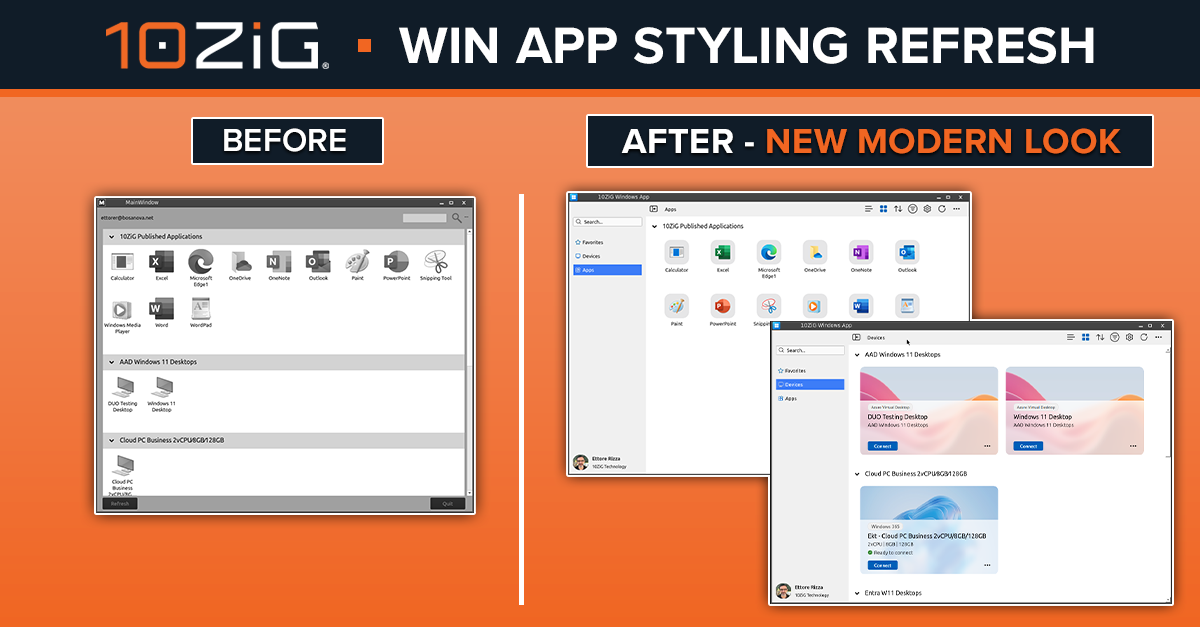
PHOENIX, ARIZONA – With the recently successful 16.5.39 firmware release just breaking new ground, 10ZiG Technology is already onto more cutting-edge firmware updating including a smart refresh to Windows App Styling, replacing the original MS RD Client Styling within the AVD Client. The latest firmware update, 16.5.39, brought with it a new UI (User Interface), improved boot speed, Omnissa Rebranding, AVD, Imprivata, and MS Teams advancements, Secure Boot support, and more. Inspired by these exciting enhancements, 10ZiG has forged ahead with Windows App Styling changes, previewing right now as a hotfix via 16.5.39.1.

The idea behind the modern stylish makeover is that the UX will be ā€˜easier on the eye’ and aligned with the same experience as running the native windows app on windows and mac operating systems. The Windows App appearance and style would be more familiar to and understood by end users, providing consistency and standardization, and can add a level of comfort while saving time. The same idea extends to IT support in terms of experience in working with Windows-styled interfaces and may even expedite troubleshooting, etc. All of this and more leads to a more consistent, cohesive digital workspace – in office, remote, or hybrid environments. Plus, Windows App Styling may help to align and future-proof newer versions of Windows, potentially reducing major upcoming reworks.

10ZiG Senior Technology Advisor Ettore Rizza, ā€œOur .39.1 Firmware Windows App Styling Refresh is the true definition of a makeover. It restyles our AVD Client application and desktop areas with the theme, layout, and visual appearance of the original Microsoft Windows App program. This includes coloration and design for menus, buttons, icons, and other user interface items, and adds a favorites menu selection as well. Alongside that, we developed a dark theme with exactly all of the same bells and whistles. A big benefit of this restyling is that the same modern branding and theming provides cohesiveness and professionalism across all devices.ā€Ā Ā 

About 10ZiG Technology

10ZiG Technology is a leading Thin & Zero Client hardware and software provider delivering a modernized and secure user experience for VDI, DaaS, or Web-based environments. With 20+ years in the Thin Client endpoint market, no-hassle repurposing software, and easy-to-use free management, 10ZiG is the perfect Single-Vendor Strategy. With local support included and a wide range of TAA Compliant options from traditional desktop form factor, Thin Client laptops, and All-In-Ones, along with an array of unique features including Fiber, Wireless support, quad screen, and more, 10ZiG is the secure, managed solution for today’s diverse IT requirements. Our ever-growing 10ZiG ecosystem of technology partners helps keep 10ZiG product cutting-edge and flexible by incorporating leading connection brokers like Omnissa, Microsoft, Citrix, and more. Find your solution at www.10zig.com.

Corporate Headquarters, US

10ZiG Technology Inc.

2043 West Lone Cactus Drive

Phoenix, AZ 85027, USA

+1 (866) 865-5250 | Email: [email protected] | Web: www.10ZiG.com

EMEA Headquarters

10ZiG Technology Ltd.

7 Highcliffe Road

Leicester LE5 1TY, UK

+44 (0) 116 2148650 | Email: [email protected] | Web: www.10ZiG.com

DACH Headquarters

10ZiG Technology GmbH

Nymphenburger Straße 3b

80335 München

0160 92472602 | Email: [email protected] | Web: www.10ZiG.de

Ā 

10ZiG is Part of Omnissa ONE EMEA in Amsterdam, October 7-8!

10ZiG is Part of Omnissa ONE EMEA in Amsterdam, October 7-8!

10ZiG will be heading out to Amsterdam to get ā€œboothreadyā€ for the 2025 EMEA edition of Omnissa ONE! Join us for LIVE demos, great conversation, product giveaways, and PRIZE raffles! Ask us about our single-vendor, Omnissa Ready endpoint strategy that covers NEW 10ZiG hardware and Repurposing Existing Windows Assets to provide a secure, high-performance, standardized endpoint UX across your estate. Also, did we mention 100% FREE Central Management?Ā Ā 

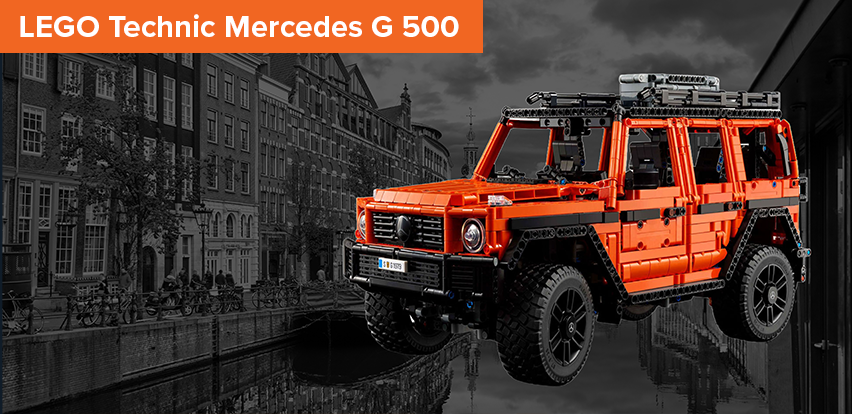
WIN in Amsterdam, or WIN a second LEGO Technic Mercedes G 500 if You Aren’t Going to be There

Just Click HERE to Enter!Ā 

Explore the 10ZiG & Omnissa Partnership HERE

Of course, we’re ā€˜Better Together!’ 

10ZiG Solutions Being Showcased at Omnissa ONE Amsterdam

Modernized Thin & Zero ClientsĀ 

A wide range of Omnissa Ready hardware providing flexible, secure, and high-end experience with Omnissa Horizon, Workspace, and App Volumes. With a choice of Linux or Windows 11 IoT and different OS modality options to suit the UX you want to deliver, hardware form factors include traditional standalone, mobile (laptops), and all-in-ones. There is a wide range of display and connectivity options too, such as Wireless, Fiber, Smart Card Readers and much more. 10ZiG’s long lifespan endpoints are TAA Compliant and come with the 100% FREE, feature-rich 10ZiG Manager server with an unlimited user license.Ā Ā 

FREE demos available >  Free Demo for Thin & Zero Clients | 10ZiGĀ 

10ZiG RepurpOSā„¢ – Secure Linux OSĀ 

10ZiG offers organizations the chance to implement a truly sustainable endpoint strategy. Not only does 10ZiG provide hardware, but the flexibility of the 10ZiG offering means that you can leverage the benefits of 10ZiG RepurpOSā„¢. RepurpOSā„¢ is a secure Linux OS that turns existing third-party PCs, laptops, and thin clients into dedicated, secure, Omnissa Ready endpoints. Running in perfect harmony alongside 10ZiG hardware, you can deliver the same, secure, standardized OS UX across native 10ZiG hardware and existing Windows assets. With secure Linux OS migration incentives and ongoing low and simple licensing costs, 10ZiG can help you to navigate the issue of non-TPM devices when considering the move from Windows 10 to 11.Ā Ā 

FREE Download Available > 10ZiG RepurpOS Software: Endpoint Repurpose Linux OSĀ 

10ZiG ManagerĀ 

The 10ZiG Managerā„¢ is 100% FREE with all 10ZiG hardware and software based endpoints and is available as either a Windows-based centralized management tool that can be hosted anywhere, or as a Linux virtual appliance for on-premises virtualized instances. You can securely manage 10ZiG endpoints anywhere from on-location with a feature-rich array of tools and support to make managing your 10ZiG endpoints intuitive and seamless. These include Automatic Configuration & Firmware Versioning, Role Based Access, Active Directory & Entra Supportive, Multi-tenancy capability, Secure Shadowing, Power Management & Scheduled Tasks, Distributed Firmware Versioning (DFV), and Reporting.Ā 

See 10ZiG Manager Here > 10ZiG Manager: Central Management Software for EndpointsĀ 

Trusted Zero ClientsĀ 

Putting the ā€˜Trustā€ in Zero Client Hardware and connections to HP Anyware with PCoIP & Omnissa Horizon with Blast Extreme. Clients are designed for zero trust architectures, offering the very best in remoting security and performance, including secure boot, direct to Trusted Zero Client (no OS or BIOS access for users). With dual and quad screen options, you can deliver a color-accurate, lossless, and distortion-free experience all while adhering to zero trust principles as recommended by NIST and other similar organizations. TPM2.0, TAA Compliant, and FIPS 140-3 certified.Ā 

More Details and FREE demos available > Trusted Zero ClientsĀ 

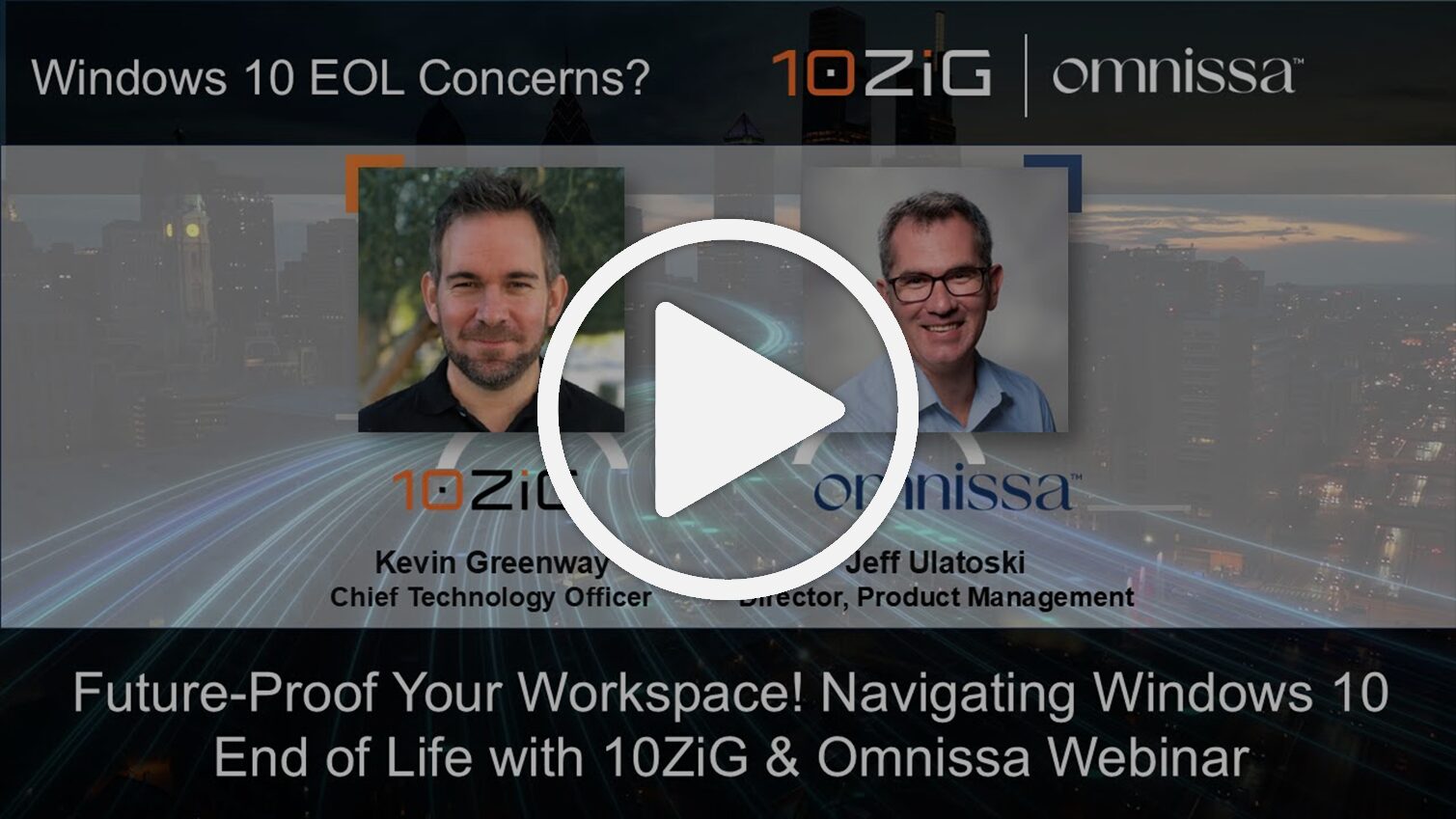
Future Proof Your Workspace Navigating Windows 10 End of Life with 10ZiG & Omnissa


Don’t let Windows EOL catch you off guard! With Windows 10 End of Life (EOL) fast approaching in October 2025, organizations face a critical need to modernize their desktop environments. This webinar explores how to seamlessly and cost-effectively migrate from Windows 10 to Windows 11 with an integrated and hassle-free combined solution.Ā Ā 

Omnissa expert Jeff Ulatoski, Director, Product Management together with 10ZiG expert, Kevin Greenway, Chief Technology Officer, cover strategies to:Ā Ā 

  • Prepare your infrastructure for Windows 11 deploymentĀ 
  • Streamline application delivery with App Volumes for faster rollouts & reduced management overheadĀ 
  • Leverage Omnissa Ready 10ZiG endpoint solutions, including a flexible, secure, managed Linux OS for both existing Windows 10 assets and native 10ZiG Thin & Zero ClientsĀ 
  • Mitigate risks and maintain compliance in a post-Windows 10 worldĀ 

Omnissa Ready Secure Linux OS HEREĀ 

Omnissa Ready Hardware Solutions HEREĀ 

Become a 10ZiG Ready Partner

Apply to become a 10ZiG Ready Partner HERE and let’s start creating great stories together.

Get Your 30-Day
Free Demo

Experience the power of 10ZiG risk-free. No credit card. No obligation.