Choosing Thin Client Solutions For Your VDI Environment?

Choosing Thin Client Solutions For Your VDI Environment?

So, you’ve found yourself in the market for some Thin Client Solutions and are overwhelmed as to where to begin? Not so unusual, even for IT professionals. There’s a lot out there; 10ZiG or not, there are critical standards and features that can guide and narrow your selection.

Benefits of Thin Client Solutions are Worth it

If you’ve come this far with your VDI Proof of Concept, you agree that there is no denying the many benefits of working with Thin Client Solutions. Thin Clients are easier to deploy, manage, and maintain than PC monsters. Related Thin Client Management Software allows administrators to save time and money by maintaining all devices from the server… meaning upgrades, application deployments, and virus control can be centrally managed, rather than being handled individually at workstations.

By design, Thin Client Solutions don’t have any moving parts and therefore provide a much longer life expectancy than a PC. When it comes to security, they prevent users from loading applications onto their devices, which significantly reduces the risk of viruses. Additional benefits of Thin Clients include a small footprint on the desk, lower power consumption, and server-centralized data storage.

Where to begin when shopping for Thin Client Solutions

Here’s a Self-Starter Quick Guide Checklist to get you going with your Thin Client shopping research:

  • Operating System: Linux, WES7, WE8S, Windows 10IoT
  • Platform(s) Support: VMWare Horizon; PCoIP, Blast Extreme (H.264), RDP – Citrix; HDX Ready, HDX Premium, HDX 3D Pro – Microsoft VDI/RDSH – RDP – Parallels; Remote Application Service (RAS)
  • Applications/Graphics Support: Web Browser, 5250 Emulation, PDF Viewer, Power Term, Office Viewers, Flash Support
  • Display & Monitors: Single/Dual Screen Support, Quad Screen Support, DVI-Ds, DVI-Is, VGAs (with Converters), DisplayPorts
  • Connectivity: USB 2.0 Ports, USB 3.0 Ports, Serial Ports, Parallel Port, Expansion Slot PCI, Internal Smart Card (CAC)
  • Networking: 10/100/1000 Base-T Gigabit Ethernet, 802.11 a/b/g/n dual band, Power over Ethernet (PoE), Fiber
  • Mountings: Vertical Stand, VESA Mounting Bracket
  • Centralized Management Utility: Available, FREE Software
  • Free Demo: FREE 30 days, no obligation
  • Warranty: No-cost, Advance Replacement
  • Cost: Competitively priced
  • Tech Support: Available and no-charge

The above is a quick guide to jump start your Thin Client product research. Your current environment (desktop or VDI); product expectation, usage and performance; number of endpoint users, budgetary considerations; what phase you are in with your VDI POC; and much more… all factor into what will be the best Thin Client Solution choice for you and your team.

Why not take the Thin Client selection guesswork away with 10ZiG’s Thin Client Solutions Product Grid? – search for all of the above by OS or VDI Platform. Or, talk directly to someone who could help you at 1-866-865-5250.

About 10ZiG Thin Client Solutions

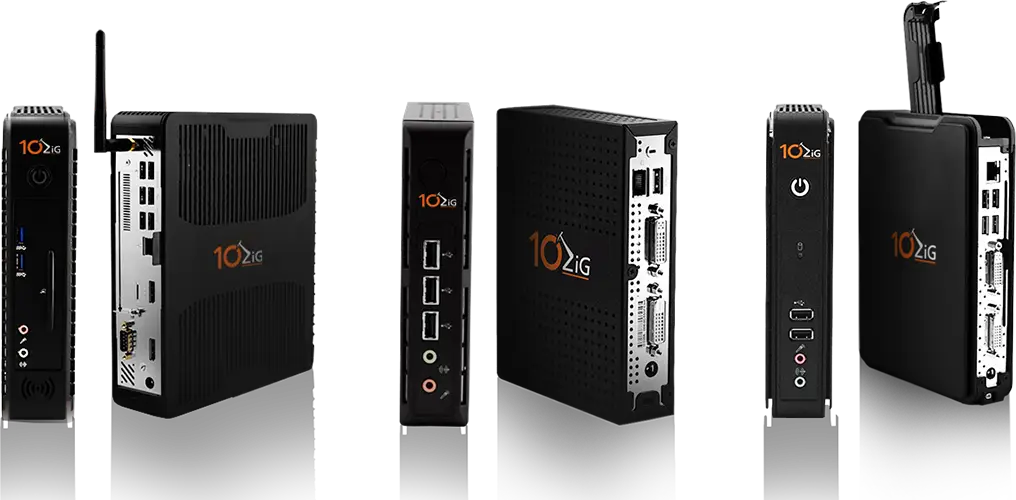
10ZiG offers a wide selection of powerful, reliable, and affordable Thin Client Solutions. Our devices are constructed to provide the best performance possible in VDI and Server-Based Applications/Desktops for both hosted and cloud environments. 10ZiG Thin Clients are optimized for the latest desktop technologies including VMware, Citrix, and Microsoft and harness the power to support protocols such as PCoIP, Blast Extreme, HDX, HDX Premium, HDX 3D Pro, and RDP.

10ZiG Thin Clients have been designed to meet the needs of all types of users, from task-based right through to power-users requiring full HD multimedia, 3D, CAD and/or quad screen support. Our Thin Client devices come in a thoughtfully constructed set of benefit features designed to ensure you receive the proper Thin Client based on your consumption and power needs. Additionally, our Thin Client Management Software provides centralized ways to configure, maintain, control, and even report from all 10ZIG Linux & Windows based Thin Client devices for traditional managed networks. It is included FREE with purchase and supports unlimited user licenses.

Do you want to come into the world of VDI, but don’t have the IT budget to refresh all of your desktops? Repurpose your PCs! 10ZiG provides the perfect solution for you – 10ZiG NoTouch PC Repurposing Software. 10ZiG NoTouch works as a two-part solution to consolidate old, aging legacy hardware into a locked down, secure, and intergraded Thin Client-like platform. Any PC (after 1998) is capable of being converted.

Power. Speed. Performance. 10ZiG!
Thin Client & Zero Client Management Made Easy; The 10ZiG Manager Training Webinar

Thin Client & Zero Client Management Made Easy; The 10ZiG Manager Training Webinar

Master the key Functionalities of our Centralized Management Thin Client and Zero Client Software in just 30 Minutes!

Thursday, May 18, 11am PT / 2pm ET

At 10ZiG, one of the biggest things we like to do is make VDI life easier for IT professionals of all kinds. Sometimes the VDI world can get tricky. Your Thin Client & Zero Client Software for Centralized Management does not have to be; tricky, that is. You’ve got enough to deal with…

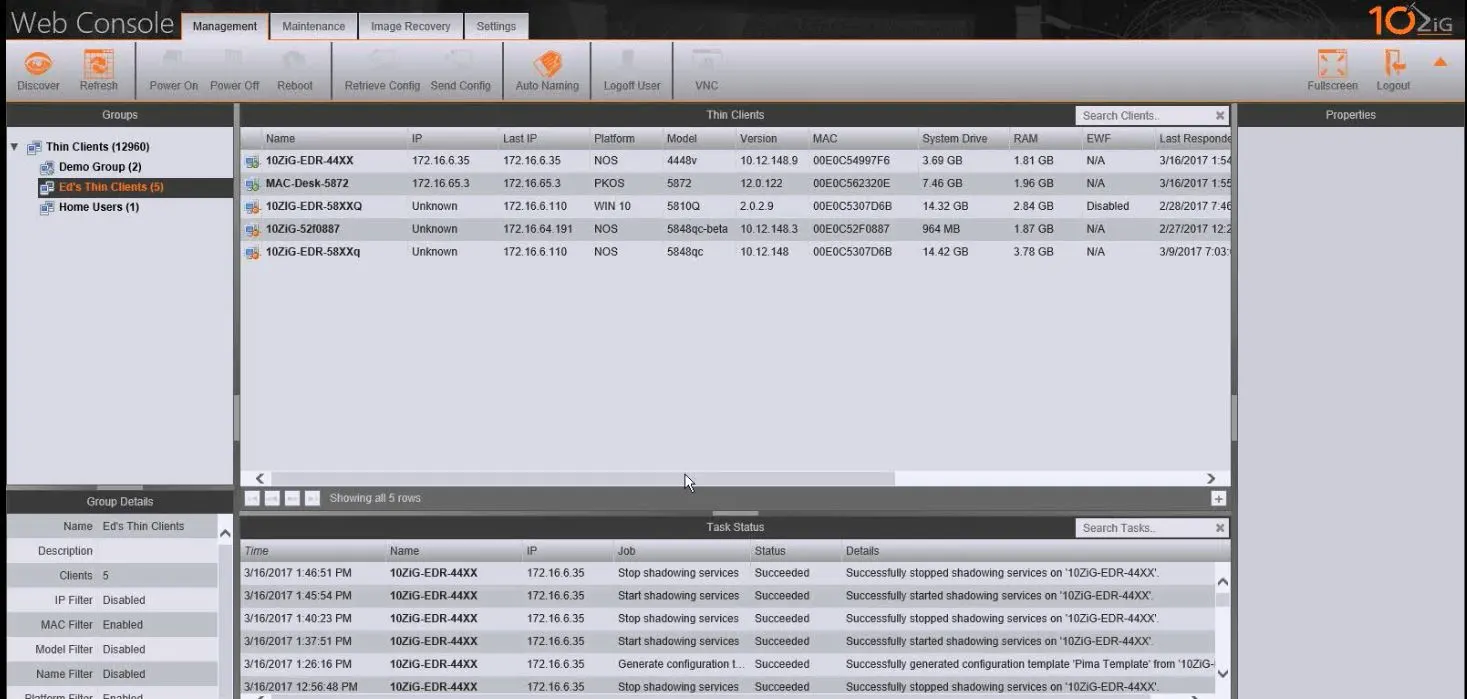
Make VDI Thin Client & Zero Client Management easier with our simple-to-understand, user-friendly, highly-functional “10ZiG Manager.” The 10ZiG Manager, server-console or web-console (Cloud), is always FREE with client purchase and makes endpoint management, configuration, and deployment efficient and effortless.

Our “How To” Training Webinar makes things even easier! 10ZiG will get you up and running with The 10ZiG Manager in just about 30 minutes. Whether you have The 10ZiG Manager, are in the planning phase of your VDI POC, or just simply interested… be sure to join us on May 18th as we walk you through the main functionalities of our sought-after, top-of-the-line Centralized Management Utility Software.

10ZiG offers the best in VDI Thin Client & Zero Client hardware and also backs it up with the best Centralized Management Software Utility. We listen to what the market dictates, and more importantly, to our customers… to develop and offer only the best in an up-to-date, cutting-edge endpoint management software program.

The 10ZiG Manager is known for many industry-wanted features including the highly-capable Thin Client Patch Management functionality, allowing for updates with just a few clicks… less hassle and frustration, yet more accuracy.

Thin Client Software & Zero Client Software Management Made Easy!

In just 30-minutes, you’ll easily be able to utilize The 10ZiG Manager to:

  • Schedule tasks and check their status
  • Create and apply a template
  • Update and manage an image
  • Configure for individuals and groups
  • Reset a unit to default
  • Conduct client automatic naming
  • Deploy a firmware update
  • Use VNC for coaching sessions
  • Generate reports
  • Remove a unit from a group
  • Delete units from a group
  • Rename a unit
  • Create, manage, and delete groups and subgroups

You’ll also walk away with several helpful “How-To” Videos as references, with topics like…

  • Installation/Quick Setup
  • Schedule Tasks
  • Firmware Updates
  • VNC Training
  • Creating/Editing Groups
  • And more!

REGISTER FOR YOUR WEBINAR SPOT HERE!

Want to register, but need a jump start on your 10ZiG Manager Webinar experience? No problem. Get your Demo Unit and 10ZiG Manager at no cost for the next 30 days! Download the no-charge 10ZiG Manager HERE and/or get your FREE Demo Units(s) HERE… now!

10ZiG Technology is a world market leader in cutting-edge Thin Clients & Zero Clients. We live and breathe Thin & Zero technology, as it is our sole focus. With a wide range of clients to fit every virtual desktop solution, what sets us apart from the rest is our unsurpassed level of available and reliable customer service, our no-charge 10ZiG Manager Software; our no-registration, instant 3-Year Warranty with Advance Replacement program; and our hassle-free, 30-day Complimentary Demos.

Power. Speed. Performance. 10ZiG!
Want VDI Deployment At Its Best? 5 Helpful Reminders!

Want VDI Deployment At Its Best? 5 Helpful Reminders!

VDI Deployment: A Little Planning Goes a Long Way

If you’re like many, you’ve left the world of PC desktops and are living in a VDI (Virtual Desktop Infrastructure) environment… or, you are planning such a POC (Proof Of Concept) soon. Whether you’re working on an initial build with new VMs (Virtual Machines), dealing with a change or upgrade, adding new VMs, or going through a refresh cycle, etc., any VDI deployment can be even more successful when you take time for a little thoughtful checking…

A 5-Step, Pre-VDI Deployment Checklist

VDI replaces the loud, energy-hungry, overpowered Fat PC environment with better management and security of end user VMs and related data, energy and cost savings, and more. VDI deployment for VMs/VM groups are effective, safe, and easy. Here’s a simple checklist for ensuring successful VDI deployments.

1) DO SOME TESTING.

With any new POC VDI deployment, testing is the best way to help see how it will take effect. It’s a good idea to leave yourself some time for planning which VM user groups need what. Related targets and requirements should go through a UAT (User Acceptance Test) for initial performance and application support feedback prior to full VDI deployment.

2) CONSIDER YOUR SECURITY.

Not just a question of security, but also a question of cost. Don’t hold back when it comes to authenticating VMs and related users by not purchasing an SSL (Secure Socket Layer) Certificate for your host server. In addition to verifying end users when they login, any transferred ‘back and forth’ data relating to VDI deployment is encrypted and covered via a secure website.

3) CHECK IN ON STORAGE.

The correct level of IOPS (Input/Output Operations Per Second) is critical and should be specified based on number of users, user density, and user requirements. There may be heavy periods of boot or application storms, where multiple users require simultaneous access to VMs and/or applications. IOPS is as critical as your level of overall storage capacity. (Factor this in during testing.)

4) QUICK REVIEW OF NETWORK.

How is bandwidth for accommodating VM connections and communication, as well as graphic support and acceleration as it relates to host cards. What about speed? Consider adding QOS (Quality of Service) for prioritizing and queuing traffic for VM delivery protocols similar to delivering VoIP. (VoIP/VM delivery protocols/Other-Web/FTP/IM, etc.)

5) VERIFY BACKUP PLAN.

For any issue, VDI deployment or not, don’t end up with a situation that can stop ‘business as usual’ dead in its tracks. Have a disaster recovery plan put in place. For example: if your single server back plane should fail, what’s your backup plan to support your VMs? (Be sure to have VDI vendors that have excellent Tech Support staff.)

Bonus Tip: In addition, the right centralized management software console can help to achieve the best possible VDI deployment by centralizing VMs into your server/data center or cloud, as well as end points (Thin or Zero Clients) for automating selected and group configuration, shadowing, updating, and more.

About 10ZiG

If you don’t already know, 10ZiG is a world market leader in Thin & Zero Clients for VDI Technology. The 10ZiG Manager, our FREE centralized management software, is unsurpassed. Not to mention, our Customer Support is the best in the industry. Give us a call at 866-865-5250 or click here to have a no-charge, 30-day demo unit(s) of choice shipped out today.

Blast Extreme vs. PCoIP – Which Protocol is Right For You?

Blast Extreme vs. PCoIP – Which Protocol is Right For You?

With the release of VMware Horizon 7 featuring Blast Extreme, there is good reason to be questioning and researching the difference between it and PCoIP. While there is no “one-fits-all” scenario, this will shed some light on their individual capabilities.


Blast Extreme

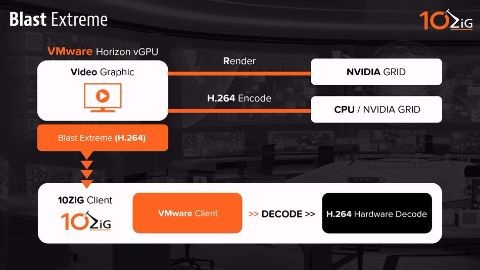
Blast Extreme was designed with mobile networks and devices in mind, being based upon H.264 video format coding. Nearly any type of device can decode this protocol. It can be used on general purpose hardware, resulting in acceleration of operation where H.264 hardware decoding is supported. It requires less bandwidth than PCoIP and supports TCP and UDP, so it is more suitable for mobile and lossy networks. Additionally, Blast Extreme works well for new deployments where servers are equipped with server-based GPUs that support H.264 encode capability. Such cards are able to offload H.264 encoding tasks from server CPU resulting in increased server scalability.

Scenario:

Blast Extreme may be a good option if you have invested in a NVIDIA GRID (Telsa M cards) and have many mobile users, affording longer battery lives and better performance.

PCoIP

Best for multi-monitor set ups, PCoIP supports multiple codecs for different displays like text, image, and video. It also supports configurable server/client CPU and bandwidth use. Unlike Blast Extreme, it allows for the compression and decompression of images, i.e. lossless support. To allow for increased server scalability, encoding is optionally offloaded onto APEX 2800 LP hardware, a dedicated and separate interface card. The card is a cost-saving value when compared to Blast Extreme functionality, which requires server-side GPUs to support graphics rendering H.264 encode. A Teradici zero client is required, or if using general purpose hardware (x86 architecture), a mid-to-high end CPU is recommended, for decoding PCoIP.

Scenario:

PCoIP may be a good consideration for Healthcare, Financial, CAD, and Media sectors, and/or if you require multi-monitor lossless support with configurable bandwidth and tuning options.

Let’s be clear: where both protocols are suited for any one deployment, VMware Horizon 7 supports both, simultaneously. And, whether your deployment is better aligned for Blast Extreme or PCoIP, the good news is that there is a protocol and client that matches your VDI scenario.

About 10ZiG

10ZiG Technology is a market leader in cutting-edge Thin Client and Zero Client devices. We live and breathe Thin and Zero technology, as it is our sole focus. With a wide range of clients to fit every virtual desktop solution, what sets us apart from the rest is our unsurpassed level of available and reliable customer service, our no-charge 10ZiG Manager Software, our no-registration, instant 3-Year Warranty with Advance Replacement program, and our hassle-free, 30-day Complimentary Demos. Power. Speed. Performance. 10ZiG!
10ZiG & Azure Virtual Desktop (formerly Windows Virtual Desktop)

10ZiG & Azure Virtual Desktop (formerly Windows Virtual Desktop)

Microsoft Azure Virtual Desktop (formerly Windows Virtual Desktop), a fully-managed desktop virtualization solution on the Azure public cloud-computing platform is now fully supported with 10ZiG Technology.

Azure Virtual Desktop (formerly Windows Virtual Desktop) and its ground-breaking feature of providing the only multi-session Windows 10 experience for desktop virtualization, is a complementary fit with 10ZiG Linux (NOS™) and Windows 10 IoT based Thin & Zero Client Endpoints and The 10ZiG Manager™ Enterprise Software… creating a perfect virtual desktop experience in the Cloud.

10ZiG Technology, with cutting-edge Thin & Zero Client hardware and software, is a longstanding partner with Microsoft and integrates with Microsoft Azure and Azure Virtual Desktop (formerly Windows Virtual Desktop). 10ZiG Linux (NOS™) and Windows 10 IoT based Thin & Zero Client Endpoints are powerful, reliable, and affordable endpoints for all Azure Virtual Desktop (formerly Windows Virtual Desktop) multi-users. The 10ZiG Manager Software provides exceptional management and deployment without license limitations at no additional cost. The 10ZiG Tech Team, Advance Warranty Program, and no-hassle Demos are a one-stop shop as a Azure Virtual Desktop (formerly Windows Virtual Desktop) multi-session support solution in the Cloud.

10ZiG’s world-market leadership in Thin & Zero Client endpoint devices and management software for virtual desktops is exemplified by how we work for our customers. Our Thin & Zero Client hardware comes with thoughtfully constructed benefit features and options designed to ensure customers receive the right Client devices based on their needs. We customize our devices to fit into customer environments with Linux (NOS™) and Windows 10 IoT based Clients that provide the best possible performance in virtual desktops, both in and out of the Cloud.

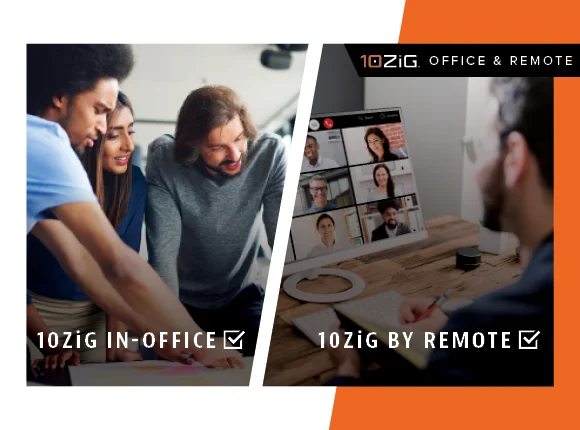
Click Here For In-Office or By Remote > 10ZiG Microsoft Ready Endpoints


Thin Clients vs. Zero Clients for VDI | 10ZiG Technology

Thin Clients vs. Zero Clients for VDI | 10ZiG Technology

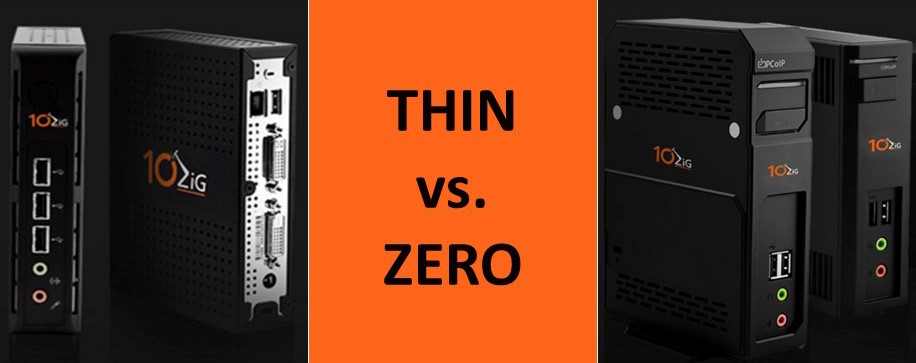
By illustrating the differences between Thin Clients and Zero Clients I hope to better define them as well. Both are small form factor, solid state computing devices, specifically designed for a server based typology, currently generally associated with Desktop Virtualization (VDI) and Host Desktop Environments (DaaS), but they have many different characteristics that are important to distinguish. Below we will discuss the key differences between Thin Clients and Zero Clients.

Thin Clients

Thin Client devices are traditionally end-point devices with some flavor of skinny, optimized, locked-down OS. The most common current type of Thin Clients run on Linux or Windows Embedded (WES7/WE8), and to a much lesser and declining degree Windows CE. Windows CE is deployed much less frequently due to the lack of available current connection brokers by major providers, as well as limited peripheral support. It is extremely difficult for a Windows Embedded Thin Client to get a virus and with the built-in write protection filter easy to get rid of by just cycling the power. As the filter restricts anything to be written to the solid state storage. It is impossible for a Linux Thin Client to get a virus.

Zero Clients

Instead of an operating system, Zero Clients have a highly tuned on-board processor specifically designed for one possibly three VDI protocols (PCoIP, HDX, or RDS). Most of the decoding and display processes take place in dedicated hardware and therefore are more efficient than using a software client and a standard CPU and GPU setup as with a Thin Client. Zero Clients have boot up speeds of just a few seconds and are immune to viruses, malware and the like. Thus decreasing the overall downtime of the device and increasing the productivity to the end-user. The Zero Client device requires very little maintenance and rarely needs an update unless there is a significant change/enhancement to the VDI protocol or the occasional BIOS related update, which usually has to do with improved/additional peripheral support.

Let’s Compare and Contrast the Differences Between Thin Client and Zero Clients:

Connection Type:

One factor that distinguishes the differences between Thin and Zero Clients is their connection type.

  • Thin Clients usually contain multiple connection brokers, such as VMware Horizon, Citrix XenDesktop, and Microsoft RDP to name a few. This provides some flexibility if you are running multiple brokers, which can be common especially during a migration from one to another. These connection types are managed with a central utility, which provides the ability to efficiently maintain and apply updates to the connection brokers, as well as control, shadow, restart, and push out a cloned configuration to multiple units*. Note these management features are supported by 10ZiG and may not be universal throughout the industry.
  • Zero Clients run only with one connection type largely being either Citrix or VMware. They are optimized for that specific broker. Usually providing a limited user interface as most just boot into the sign on screen of said broker. These devices can also be centrally managed, but is many of the management features are not available or potentially not needed in the case of a zero client.

The reason so many people go with Thin Client devices for their VDI implementation is because of their great flexibility. Thin Client devices are able to change connection brokers (ex. VMware to Citrix) when required by your company’s quickly evolving desktop needs or dictated by shifting corporation directions due to acquisition. Though flexibility is a great selling point, Zero Clients are finely tuned for a specific protocol which offers an unparalleled video experience. 10ZiG’s V1200 is a prime example of a Zero Client for PCoIP that offers exceptional video graphics; this unit is specifically designed with the Teradici PCoIP Portal Processor. Teradici being the creator of VMware’s PCoIP Protocol.

Configuration:

The configuration process is another factor that compares Thin Clients vs. Zero Clients.

  • Thin Clients are usually configured using a template from previous Thin Client configurations and therefore makes managing the device(s) very simple and can be done by a single IT administrator either locally or remotely. With Thin Clients, software updates are usually larger and can be more frequently than that of Zero Clients because of their extensive features. Thin Client software updates are still very small and far less frequent compared to a PC. Rarely occurring more than a couple times a year. Especially as a thin clients do not have the security vulnerabilities inherent of the PC. Thin Clients provide a future-proof design focused more on flexibility than pure performance
  • Zero Clients by default have a relatively simple set of configurations compared to a Thin Client. Software updates for Zero Clients are usually minute, for example our V1200 Series Tera2 PCoIP Zero Clients containing the Teradici PCoIP chipset usually only have updates for the PCoIP protocol itself or the occasional BIOS update for improved peripheral support. This means that updates are released infrequent and are only small packet firmware updates when they are . Zero Clients have very minimal firmware maintenance.

Keep in mind that though Thin Clients can have more sizable updates, the updates can be scheduled to be done at off-peak times so that end-users are unaware of the update and it does not affect their productivity and peak bandwidth usage

Task Capabilities:

Identifying the application needs of the end-user is an important consideration when choosing Thin Clients or Zero Clients.

  • Thin Clients are known for being flexible and designed for the needs of the individual end-user. IT managers can simply drag and drop the proper applications to the Thin Client for the end-user to access ranging from graphic design applications for the advanced user to very simple Microsoft Office applications for the every-day task worker. Thin Clients have the ability for installed applications such as browsers, email clients, office/PDF viewers, device drivers as well as, connectivity to any legacy client server application.
  • Zero Clients will only have the applications which are provisioned to them from the virtual desktop or application server. These devices can handle the most graphically demanding applications and can support the highest quality multi-media. Zero Clients are also the perfect fit for those looking to use quad monitors without suffering significant performance degradation.

Typically, the exceptional graphics capability, ultra-low power, fast boot-up and easy management are the characteristics that people go for when deciding to deploy a Zero Client. Others go for the highly flexible, well-rounded Thin Client that proves to provide the truest desktop experience.

Looking to do a VDI POC in the near future? Register now to take advantage of a FREE, no hassle Thin or Zero Client demo. CLICK HERE to request your demo today!

Choosing the Best Thin Clients for your System i (iSeries)

Choosing the Right Thin Clients for your System i (iSeries)

Choosing the Right Thin Clients for your System i (iSeries)

The benefits of thin clients are legion, but the right configuration is critical.

By Martin Pladgeman

In the beginning, thin-client terminals booted from a server, had very slow CPUs with small amounts of memory, and relied on application servers to provide needed features. It is no surprise that these early thin clients didn’t take off because delivery was poor (high bandwidth requirements, low color support, no sound, etc.) and the application servers themselves didn’t support applications very well.

Over the last few years, the story has changed. Thin clients have been enhanced to support faster CPUs, faster video, and increased and faster memory. Today, popular software applications typically work well in a terminal server environment, application server software has improved significantly, and server hardware prices have plummeted. All of these factors have contributed to the surge in demand for thin clients.

Many Benefits

There are many benefits to implementing thin clients in today’s iSeries environment. Thin clients are easier to deploy, manage, and maintain than their PC counterparts, and thin-client management software allows administrators to save time and money by maintaining all devices from the server. This means that upgrades, application deployments, and virus updates can be centrally managed rather than being managed at individual workstation locations.

Thin clients by design don’t have any moving parts and therefore provide a much longer life expectancy than a PC. When it comes to security, thin clients prevent users from loading applications onto their devices, which significantly reduces the risk of viruses in your environment. In the small chance that a virus does occur, you can simply reboot the thin client device, which returns it to its original, virus-free state.

Other benefits of thin clients include a small footprint on the desk, lower power consumption, and server-centralized data storage.

Thin-Client Options

Now that we have addressed some of the benefits of deploying thin clients, it is important to understand your options as there are many factors to consider when looking for the best fit for your environment. These are the top three considerations:

  1. Performance
  2. Operating System
  3. Environment

Performance

Ever since thin clients were introduced, there has been a misconception that the CPU on the thin client is unimportant (unlike PCs), the thought being that the thin client merely animates the screen content and sends the keyboard and mouse data to the server, where the processing is actually done. But this isn’t always the case. Just as thin clients have evolved so has the demand for the processing power required to handle higher-end applications. In particular, server applications that use multimedia are impacted by low-performance thin clients. Tests reveal that thin clients with low-spec CPU are simply unable to keep up with the demands for both audio and video. Even PowerPoint can be enough to cause unacceptable performance problems. Embedded applications such as 5250 emulation are particularly susceptible to poor CPU performance.

Operating System

The operating system is an important consideration when researching thin clients for your environment. Two different thin clients that have the same OS are not alike—and it is not just the hardware that may be different. Some manufacturers sell the base OS image, and others spend the time to add additional features to that image to enhance the thin client. Do your research and you’ll be able to determine the best fit for you. When purchasing thin clients, you’ll be faced with a choice of CE.Net, Linux, and XP Embedded.

CE.Net

This OS starts life with a stock set of features provided by Microsoft in the platform builder. The browser is Internet Explorer Compact Edition, which does not support pop-up windows or Active X. In addition, the ability to right-click and edit the applications’ properties (desktop mode) is missing. Some thin-client manufacturers add functional enhancements to the OS while others do not. There are several other small differences, such as the version of ICA (Citrix), network share ability, etc.

Although it appears to offer many useful applications, CE.Net often falls short of what users expect because of OS limitations. Windows XP, for example, has hundreds of resident fonts. CE.Net usually contains three to five fonts. This can negatively affect Web browsing and file viewing. If you need a full-featured browser, HTML support on email, or file viewers, CE.Net is not the right choice for you. If you are looking for an inexpensive thin client with a simple user interface, CE.Net may be one option to consider.

Linux

Implementations of Linux on thin clients can and do vary tremendously from one manufacturer to another. Some of the most important differences include user interface, Web browsers, email support, network shares, etc. In some models of Linux thin clients, you can find support for Lotus Notes, Sun JVM, full-featured email client, full-function Web browser, OpenOffice, Adobe Acrobat Reader, file server access, and much more.

Linux is by far the most efficient OS for 5250 emulation. One consideration when evaluating Linux options is printing: Text works fine, but if users need to print images from the embedded browser, Linux may not be the right fit.

XP Embedded (XPe)

This operating system is a derivative of XP Professional and is similar to the CE.Net platform builder. XP Embedded utilizes a target designer. It is a purpose-built OS utilizing XP Pro components. To enable deployment on the small storage capacities that exist in thin clients, the components must be selected with great care. The end result (the image) is dependent on the image builder. XP components are built in and taken out as required. If you experience a problem with a Windows 32-bit application not working with XPe, the reason is probably that a component was not included by the manufacturer when the XPe image was created. Although more expensive than other OS offerings for thin clients, XPe offers a number of advantages for companies that have specific needs. With XPe, you can have limitless device drivers, most Windows applications can be installed (with the notable exception of “Office Automation” products like Word, Excel, etc. because of restrictions from Microsoft), Lotus Notes is supported, and the OS works with any Web site. If you have specific needs, some manufacturers offer the option to customize your XPe thin client to meet those needs.

Environment

In order to determine the best thin client for you, you must evaluate your environment to be sure that your specific needs will be met. If you are an iSeries shop, then it is likely that 5250 emulation is important to you; therefore, you need to find a manufacturer that understands and can deliver on your needs.

The manufacturer of the OS and software image for the thin client can make a significant difference; for example, if the creator of the image is also the creator of the 5250 program, the processor/memory priority given to the 5250 can be tweaked. Many thin-client companies rely on R&D from Taiwan, where generic images are created to cater to the mass market.

Third-party emulators are added afterward to provide additional functionality for host access. Often, these emulators are a “jack-of-all-trades” offering that emulates not only 5250 but also 3270, ASCII, SCO, Wyse, VT, ANSI 5250, etc. While this type of approach is economical in space, it often does not provide the enhanced features iSeries customers have come to expect and rely on—for example, IBM Client Access. Terminal users are also often left wanting, since familiar features like keyboard-enabled “record/playback” now require a mouse. The screen is cluttered with menu and status bars where there was once a clean green-screen. Users may also find that split-screen capabilities have disappeared.

In addition, when generic emulators are supplied with thin clients, the release of the 5250 emulation session doesn’t always occur properly. TN5250 uses TCP/IP to create a two-way communication session with the host system. If a user powers down the thin client without first exiting from the emulation (as is typical with a “dumb” twinax terminal), the host system will often not release the session because it does not recognize that the user is no longer connected. Manufacturers that focus on the iSeries market are well aware of this issue and perform a soft power-down that allows the application to send a termination message to the host before powering off the unit. This way, the host computer knows to close the session so that it is ready to be used when the terminal is powered up again.

The Benefits of Thin Clients Are Endless

Thin clients have evolved tremendously over the past few years and as a result are much more complex than the restricted devices they once were. The benefits of deploying thin clients are endless. However, it’s important to understand that not all thin client configurations are created equal. Spend the time to determine which OS and software will provide the most benefit to your users and then look at which manufacturer’s thin-client implementation can best meet these needs.

Martin Pladgeman is President of 10ZiG Technology, a leading developer of security solutions, enterprise-class thin clients and iSeries connectivity solutions. 10ZiG thin clients provides a choice between CE.Net, LINUX, and XP Embedded and offers a host of unique features.

Contact us at 866-865-5250 or [email protected] for a free 30-day trial or for more information.

FAQ

Duis suscipit ornare leo sed tincidunt. Nullam sodales vitae turpis eu placerat. Maecenas bibendum arcu sed feugiat sodales. Fusce ullamcorper nisi felis, quis feugiat ante bibendum in. Donec tempor mi risus. Nulla facilisi. Pellentesque dui justo, eleifend ut augue vitae, maximus viverra ligula. Nulla facilisi.

Morbi eu augue et diam euismod consectetur malesuada in mauris. Phasellus lacinia neque ut diam feugiat rutrum. Aliquam ac tellus dolor. In condimentum laoreet sem, a volutpat libero bibendum vitae. Maecenas lacus massa, suscipit in enim a, luctus suscipit elit. Curabitur nisi mi, aliquet ac massa sit amet, elementum condimentum nibh. Morbi et sagittis sapien. Vestibulum nulla erat, ullamcorper eget ornare non, tincidunt sed urna. Duis rhoncus id nisl non consectetur. Nunc pellentesque nunc a nibh fringilla, ut blandit lorem sollicitudin. Proin sodales in mauris ut pretium. Maecenas nec sem eget justo ornare cursus.

  • Nullam vitae volutpat lectus
  • Nullam vitae volutpat lectus
  • Nullam vitae volutpat lectus
  • Nullam vitae volutpat lectus
  • Nullam vitae volutpat lectus

Duis suscipit ornare leo sed tincidunt. Nullam sodales vitae turpis eu placerat. Maecenas bibendum arcu sed feugiat sodales. Fusce ullamcorper nisi felis, quis feugiat ante bibendum in. Donec tempor mi risus. Nulla facilisi. Pellentesque dui justo, eleifend ut augue vitae, maximus viverra ligula. Nulla facilisi.

Morbi eu augue et diam euismod consectetur malesuada in mauris. Phasellus lacinia neque ut diam feugiat rutrum. Aliquam ac tellus dolor. In condimentum laoreet sem, a volutpat libero bibendum vitae. Maecenas lacus massa, suscipit in enim a, luctus suscipit elit. Curabitur nisi mi, aliquet ac massa sit amet, elementum condimentum nibh. Morbi et sagittis sapien. Vestibulum nulla erat, ullamcorper eget ornare non, tincidunt sed urna. Duis rhoncus id nisl non consectetur. Nunc pellentesque nunc a nibh fringilla, ut blandit lorem sollicitudin. Proin sodales in mauris ut pretium. Maecenas nec sem eget justo ornare cursus.

  • Nullam vitae volutpat lectus
  • Nullam vitae volutpat lectus
  • Nullam vitae volutpat lectus
  • Nullam vitae volutpat lectus
  • Nullam vitae volutpat lectus

Duis suscipit ornare leo sed tincidunt. Nullam sodales vitae turpis eu placerat. Maecenas bibendum arcu sed feugiat sodales. Fusce ullamcorper nisi felis, quis feugiat ante bibendum in. Donec tempor mi risus. Nulla facilisi. Pellentesque dui justo, eleifend ut augue vitae, maximus viverra ligula. Nulla facilisi.

Morbi eu augue et diam euismod consectetur malesuada in mauris. Phasellus lacinia neque ut diam feugiat rutrum. Aliquam ac tellus dolor. In condimentum laoreet sem, a volutpat libero bibendum vitae. Maecenas lacus massa, suscipit in enim a, luctus suscipit elit. Curabitur nisi mi, aliquet ac massa sit amet, elementum condimentum nibh. Morbi et sagittis sapien. Vestibulum nulla erat, ullamcorper eget ornare non, tincidunt sed urna. Duis rhoncus id nisl non consectetur. Nunc pellentesque nunc a nibh fringilla, ut blandit lorem sollicitudin. Proin sodales in mauris ut pretium. Maecenas nec sem eget justo ornare cursus.

  • Nullam vitae volutpat lectus
  • Nullam vitae volutpat lectus
  • Nullam vitae volutpat lectus
  • Nullam vitae volutpat lectus
  • Nullam vitae volutpat lectus

XP Thin Client Tablet

XP Thin Client Tablet

XP Thin Client Tablet

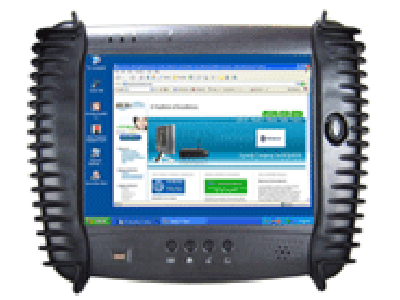
Based on Microsoft XP SP3 Professional operating system. Standard features include IE 8 browser with SUN and Microsoft JVM, Macromedia Flash, Adobe Acrobat Reader.

Windowing support for all applications, built-in Terminal Emulation, and device support for printers, USB and PCMCIA. Connection to Citrix or Terminal Server, Windows Domain servers provided — all displayed on a Windows XP desktop.

Additional Windows applications can be installed.

Included in the XP Thin Client Tablet:

  • ICA and RDP clients
  • 5250/3270 Terminal Emulation software
  • 802.11 b/g, 802.11x, 802.11n Wireless
  • Light-weight – weighs only 2 lbs.
  • Extremely Durable
  • Biometric sensor compatible with Valid Technologies
  • Customizable hot spots on integrated touch-screen displays
  • Two sizes of pop-up screen keyboards
  • Hot-swappable, secondary battery pack for extended usage
  • Optional Keyboard, Barcode Scanner and Printer – easily attached via USB port

BOStablets are a perfect fit for many environments including healthcare, manufacturing, distribution and warehouse – with custom fit for forklift operators.

All models offer:

  • AS/400 award winning software
  • Customization
  • Full array of embedded programs
  • Based on Microsoft embedded OS
  • IE 8 browser with SUN and Microsoft JVM
  • Easy to configure either locally or remotely using 10ZiG Manager Software

Contact us at 866-865-5250 or [email protected] for a free 30-day trial or for more information.

FAQ

Duis suscipit ornare leo sed tincidunt. Nullam sodales vitae turpis eu placerat. Maecenas bibendum arcu sed feugiat sodales. Fusce ullamcorper nisi felis, quis feugiat ante bibendum in. Donec tempor mi risus. Nulla facilisi. Pellentesque dui justo, eleifend ut augue vitae, maximus viverra ligula. Nulla facilisi.

Morbi eu augue et diam euismod consectetur malesuada in mauris. Phasellus lacinia neque ut diam feugiat rutrum. Aliquam ac tellus dolor. In condimentum laoreet sem, a volutpat libero bibendum vitae. Maecenas lacus massa, suscipit in enim a, luctus suscipit elit. Curabitur nisi mi, aliquet ac massa sit amet, elementum condimentum nibh. Morbi et sagittis sapien. Vestibulum nulla erat, ullamcorper eget ornare non, tincidunt sed urna. Duis rhoncus id nisl non consectetur. Nunc pellentesque nunc a nibh fringilla, ut blandit lorem sollicitudin. Proin sodales in mauris ut pretium. Maecenas nec sem eget justo ornare cursus.

  • Nullam vitae volutpat lectus
  • Nullam vitae volutpat lectus
  • Nullam vitae volutpat lectus
  • Nullam vitae volutpat lectus
  • Nullam vitae volutpat lectus

Duis suscipit ornare leo sed tincidunt. Nullam sodales vitae turpis eu placerat. Maecenas bibendum arcu sed feugiat sodales. Fusce ullamcorper nisi felis, quis feugiat ante bibendum in. Donec tempor mi risus. Nulla facilisi. Pellentesque dui justo, eleifend ut augue vitae, maximus viverra ligula. Nulla facilisi.

Morbi eu augue et diam euismod consectetur malesuada in mauris. Phasellus lacinia neque ut diam feugiat rutrum. Aliquam ac tellus dolor. In condimentum laoreet sem, a volutpat libero bibendum vitae. Maecenas lacus massa, suscipit in enim a, luctus suscipit elit. Curabitur nisi mi, aliquet ac massa sit amet, elementum condimentum nibh. Morbi et sagittis sapien. Vestibulum nulla erat, ullamcorper eget ornare non, tincidunt sed urna. Duis rhoncus id nisl non consectetur. Nunc pellentesque nunc a nibh fringilla, ut blandit lorem sollicitudin. Proin sodales in mauris ut pretium. Maecenas nec sem eget justo ornare cursus.

  • Nullam vitae volutpat lectus
  • Nullam vitae volutpat lectus
  • Nullam vitae volutpat lectus
  • Nullam vitae volutpat lectus
  • Nullam vitae volutpat lectus

Duis suscipit ornare leo sed tincidunt. Nullam sodales vitae turpis eu placerat. Maecenas bibendum arcu sed feugiat sodales. Fusce ullamcorper nisi felis, quis feugiat ante bibendum in. Donec tempor mi risus. Nulla facilisi. Pellentesque dui justo, eleifend ut augue vitae, maximus viverra ligula. Nulla facilisi.

Morbi eu augue et diam euismod consectetur malesuada in mauris. Phasellus lacinia neque ut diam feugiat rutrum. Aliquam ac tellus dolor. In condimentum laoreet sem, a volutpat libero bibendum vitae. Maecenas lacus massa, suscipit in enim a, luctus suscipit elit. Curabitur nisi mi, aliquet ac massa sit amet, elementum condimentum nibh. Morbi et sagittis sapien. Vestibulum nulla erat, ullamcorper eget ornare non, tincidunt sed urna. Duis rhoncus id nisl non consectetur. Nunc pellentesque nunc a nibh fringilla, ut blandit lorem sollicitudin. Proin sodales in mauris ut pretium. Maecenas nec sem eget justo ornare cursus.

  • Nullam vitae volutpat lectus
  • Nullam vitae volutpat lectus
  • Nullam vitae volutpat lectus
  • Nullam vitae volutpat lectus
  • Nullam vitae volutpat lectus

First Step for Your Virtual Desktop Initiative: Conduct a Proof-of-Concept

First Step for Your Virtual Desktop Initiative: Conduct a Proof-of-Concept

First Step for Your Virtual Desktop Initiative: Conduct a Proof-of-Concept

Is your organization looking to break-away from the old ways of deploying desktops? If so, how do you validate that a new approach is better, more efficient and overcomes past challenges? The answer: a Proof-of-Concept. This is the way to prove out the technology, gather intelligence about your user base, application usage, and network. It will require you to define requirements for success, those specific requirements will, of course, be different for each situation and organization. We’ve seen where some organizations want to validate how easily a Windows desktop can be delivered to worldwide users on older hardware while others wanted to see how they can make application updates occur more frequently and with less effort. The challenges will be small and large, but a methodical approach intelligence gathering and to a proof-of-concept will make resolving these challenges attainable.

It’s been said many times in the past that there are no IT projects, only business projects with IT components. We can’t stress enough that being able to fully identify what the business is trying to accomplish is the first, and most critical, aspect of the proof-of-concept. Without fully understanding the goals, the test will result in no direction and no observable outcome. Each criterion for success should be concise and well understood so there is no disagreement as to whether the solution meets the needs of the business. The success criteria should also be identified at the onset of the proof-of-concept, as the criteria could have an impact on the overall architecture.

As you move through the planning of the proof-of-concept, there needs to be an understanding of the overall goals and to verify all pieces will be ready when needed. Below is a checklist that we suggest you use to make sure you understand the goals and that you have all the pieces necessary when needed:

Item Completed Notes
Success Criteria Defined   Success criteria should be specific, measurable, achievable, realistic and timely
Success Criteria Approved by Stakeholders and Project Sponsors   It is important to have a signed statement as to the agreement of the success criteria. As time passes, the criterion has a tendency to fluctuate and increases the difficulty in determining success.
People Available  

To implement a virtual desktop environment in a test environment, different groups of individuals will be needed to understand the components and potential integration opportunities.
These individuals are:

  • Desktop operations manager
  • Network manager
  • Application manager
  • Active Directory manager
Equipment Received   Without the correct hardware, the PoC will not be capable of validating the design. Before the PoC can commence, all hardware must be ready, which includes desktop appliances, hypervisor servers, storage, etc.
Software Acquired   Without the software, the PoC cannot commence. Work with your preferred vendor to get this in place
Licenses Acquired   In order to complete the PoC, software licenses will be required. It is recommended that you have a partner be involved who can identify the required number and provide in time to start the PoC.

Next step is to create your critical success factors based on user experience, supportability, and technical components. We suggest using this matrix for your User Experience CSF (Critical Success Factors) determination:

Category Criticality Criteria
Graphics High While working with two dimensional graphics applications, users should experience smooth and responsive functionality within the application on a LAN and WAN environment
USB Storage High Users should be able to access USB storage devices from within their virtual desktop without requiring a logoff/logon
Printers High Users should be able to print to their local printers from within their virtual desktop.
Visual High Users should have the ability to control screen resolution, modify screen size for their virtual desktop
User Roaming High Users should be able to personalize their virtual desktop environment with application configurations, environment settings and user preferences. The personalization settings should follow the user from system-to-system.
Remote Access High Users should be able to get access to their virtual desktop securely and over remote connections without relying on a VPN client on the end-point.
Application Delivery High Users should only see the applications they have been assigned.
Multi-monitor Support Medium Users should be able to seamlessly span the virtual desktop across multiple monitors without requiring special configuration on the end-point
Video Medium Users should be able to view and listen to video and audio content with no significant delays, freezing, or pixilation when playing Windows media in a LAN o WAN environment.
Flash Low >Users should be able to view and listen to video and audio content with no significant delays, freezing, or pixilation when viewing Adobe Flash media in a LAN/WAN environment.

The solution must not take away functionality the user is accustomed to using now on their physical workstation. This means functionality like graphical update speed, video playback and desktop customizations (if you deem necessary) must be part of the solution and perform in many different types of environments (devices, networks, locations, etc).

From a supportability perspective, we suggest using this matrix:

Category Criticality Criteria
Redundancy High Users should be able to continue working within their virtual desktop even if there is a failure of a component within the environment.
Storage Requirements High Storage requirements should be kept to a minimum by standardizing on a single or small number of virtual desktop images.
Desktop Allocation High Adding new virtual desktops into the environment should be capable of being accomplished in a matter of minutes while using a single console.
Patch Management High Updating the operating system with the latest security patches should only be required on a single (or small number of) image(s). Those changes should be propagated to all users’ virtual desktops without requiring touching each virtual desktop.

Michael Keen, Enterprise Analyst at DABCC.com says that,

FAQ

Duis suscipit ornare leo sed tincidunt. Nullam sodales vitae turpis eu placerat. Maecenas bibendum arcu sed feugiat sodales. Fusce ullamcorper nisi felis, quis feugiat ante bibendum in. Donec tempor mi risus. Nulla facilisi. Pellentesque dui justo, eleifend ut augue vitae, maximus viverra ligula. Nulla facilisi.

Morbi eu augue et diam euismod consectetur malesuada in mauris. Phasellus lacinia neque ut diam feugiat rutrum. Aliquam ac tellus dolor. In condimentum laoreet sem, a volutpat libero bibendum vitae. Maecenas lacus massa, suscipit in enim a, luctus suscipit elit. Curabitur nisi mi, aliquet ac massa sit amet, elementum condimentum nibh. Morbi et sagittis sapien. Vestibulum nulla erat, ullamcorper eget ornare non, tincidunt sed urna. Duis rhoncus id nisl non consectetur. Nunc pellentesque nunc a nibh fringilla, ut blandit lorem sollicitudin. Proin sodales in mauris ut pretium. Maecenas nec sem eget justo ornare cursus.

  • Nullam vitae volutpat lectus
  • Nullam vitae volutpat lectus
  • Nullam vitae volutpat lectus
  • Nullam vitae volutpat lectus
  • Nullam vitae volutpat lectus

Duis suscipit ornare leo sed tincidunt. Nullam sodales vitae turpis eu placerat. Maecenas bibendum arcu sed feugiat sodales. Fusce ullamcorper nisi felis, quis feugiat ante bibendum in. Donec tempor mi risus. Nulla facilisi. Pellentesque dui justo, eleifend ut augue vitae, maximus viverra ligula. Nulla facilisi.

Morbi eu augue et diam euismod consectetur malesuada in mauris. Phasellus lacinia neque ut diam feugiat rutrum. Aliquam ac tellus dolor. In condimentum laoreet sem, a volutpat libero bibendum vitae. Maecenas lacus massa, suscipit in enim a, luctus suscipit elit. Curabitur nisi mi, aliquet ac massa sit amet, elementum condimentum nibh. Morbi et sagittis sapien. Vestibulum nulla erat, ullamcorper eget ornare non, tincidunt sed urna. Duis rhoncus id nisl non consectetur. Nunc pellentesque nunc a nibh fringilla, ut blandit lorem sollicitudin. Proin sodales in mauris ut pretium. Maecenas nec sem eget justo ornare cursus.

  • Nullam vitae volutpat lectus
  • Nullam vitae volutpat lectus
  • Nullam vitae volutpat lectus
  • Nullam vitae volutpat lectus
  • Nullam vitae volutpat lectus

Duis suscipit ornare leo sed tincidunt. Nullam sodales vitae turpis eu placerat. Maecenas bibendum arcu sed feugiat sodales. Fusce ullamcorper nisi felis, quis feugiat ante bibendum in. Donec tempor mi risus. Nulla facilisi. Pellentesque dui justo, eleifend ut augue vitae, maximus viverra ligula. Nulla facilisi.

Morbi eu augue et diam euismod consectetur malesuada in mauris. Phasellus lacinia neque ut diam feugiat rutrum. Aliquam ac tellus dolor. In condimentum laoreet sem, a volutpat libero bibendum vitae. Maecenas lacus massa, suscipit in enim a, luctus suscipit elit. Curabitur nisi mi, aliquet ac massa sit amet, elementum condimentum nibh. Morbi et sagittis sapien. Vestibulum nulla erat, ullamcorper eget ornare non, tincidunt sed urna. Duis rhoncus id nisl non consectetur. Nunc pellentesque nunc a nibh fringilla, ut blandit lorem sollicitudin. Proin sodales in mauris ut pretium. Maecenas nec sem eget justo ornare cursus.

  • Nullam vitae volutpat lectus
  • Nullam vitae volutpat lectus
  • Nullam vitae volutpat lectus
  • Nullam vitae volutpat lectus
  • Nullam vitae volutpat lectus

How to Ensure Your Virtual Desktop Initiative Succeeds

How to Ensure Your Virtual Desktop Initiative Succeeds

Empowering Virtual Desktop Infrastructure and Cloud Workspaces

How to Ensure Your Virtual Desktop Initiative Succeeds

Now is the time for virtual desktops. There are a lot of people in the industry saying that you should wait. We ask why? There are serious savings in support and energy costs to be garnered along with significant other factors that will increase agility and lower TCO. Don’t wait. If you follow the advice and steps outlined below, and build a solid business case, you will be successful.

Virtual desktops are the hottest virtualization projects for 2009 and well into 2010. There are a handful of companies doing virtual desktops in one way or another, but it seems that these “early adopters” aren’t sharing what has worked and what didn’t. So what did they do that made them successful and how can others learn for them? We asked some folks in the industry why they think VDI projects fail. The main reasons we got back were:

  • “lack of understanding what the user needs to do their job effectively”
  • “trying to push a square solution into a round hole”, basically trying to make the virtual desktop solution fit every user case
  • “lack of business case development and marketing”

Why implement virtual desktops? Here are our top five reasons:

  1. Improve client system manageability
  2. Improve security
  3. Cut upgrade, support, and maintenance costs (One side-note here is that even well-managed PC environments require constant maintenance and support to repair problems and keep systems in compliance with policy)
  4. Eliminate application conflicts
  5. Improve business continuity and disaster recovery

We can safely say that there are many reasons why you should be doing virtual desktops. So what are some of the pitfalls that have been seen in the real world?

  1. Scope creep in the project implementation
  2. Poorly managed expectations of results
  3. Lack of support for video, multimedia, printing and profile issues, all of which can lead to,
  4. User revolt (seriously, I’ve seen it and it isn’t pretty)

Before you start down the road of Proof-of-Concepts, Pilots, etc. you have to do some investigation first. What are some of the questions to ask of your IT organization leaders?

  1. Try asking your desktop support lead how many calls and desk-side support trips result from OS or application related problems.
  2. Ask your security lead about the gaps that remain to ensure that your data is secure and can be accessed only by who has authorization.
  3. We all know that the business runs on applications, so the applications team lead should be in here as well don’t you agree? Ask them what the characteristics of all “corporate-approved” apps, like performance, availability, and compatibility requirements are.
  4. And finally, from the business perspective, ask the senior business managers about what objections and push-back the business users might raise about giving up some control over “their” workstations and laptops.

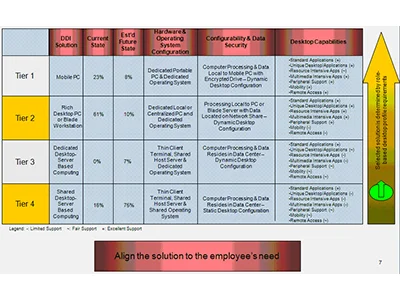
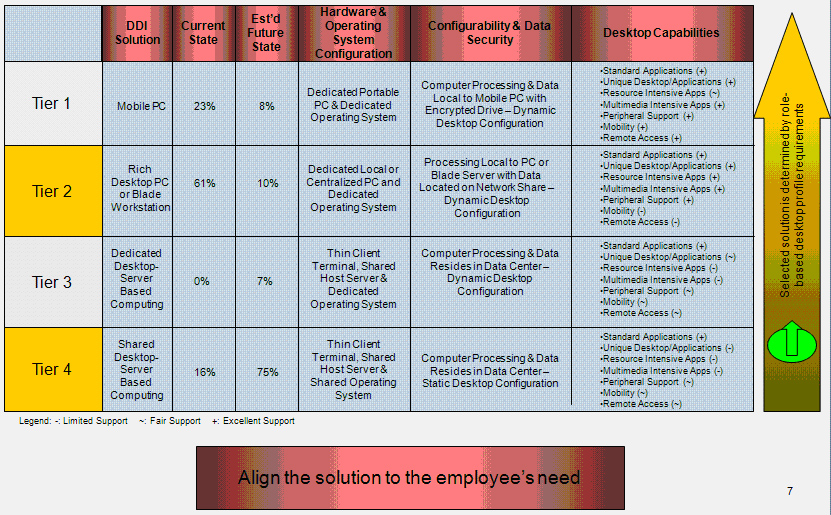
As we’ve stated above it’s critical to get a solid handle on what your users are doing and how they work. We have been in many meetings with customers who are thinking about moving down the path to virtual desktops. Most companies don’t think to put their users in tiered groups and outline what each group needs to be productive. We’ve been very impressed with the graphic below that was put together by a customer of industry analyst and Enterprise Strategist, Michael Keen. Michael states that “what’s impressive about this is the bolded statement at the bottom ’Align the solution to the employee’s need.’ Our sentiments exactly. Mr Keen also made it very clear that just categorizing your users into tiers isn’t enough. You need to gather serious intelligence about what is going on at the end point and get a true understanding of your end user behaviors. You need to understand how they interact with applications, the network, storage, etc. Then you can develop a solution that aligns to them.

Graphic used with permission from Scott Valeri

With an understanding of what, where, and how around your user base, focus on the marketing of this new solution. This is what we call “pull adoption”. This is in stark contrast to the way most users view the way new applications and other technology changes come at them, which is typically “push adoption” by IT. By taking the time to share with users the benefits of this new computing model in terms they can understand (like cost savings to the company, ease of use, etc.) it will make life much easier for you when the full rollout begins. It then becomes “our” initiative, not “your” rollout.

The next big hurdle is the business case for virtual desktops. The top five reasons we gave above are all fine and good, but what it really comes down to is the business case you build for this initiative.

In today’s perilous economic times IT budgets are being slashed. CIOs are having a tough time with changes happening continuously. More of the shrinking budget is going to maintenance and integration tasks, with little left over for innovation; but it’s not time to retrench. Retrenchment will surely buy you time, but it will not buy you opportunity, growth or a future. Now is the time for virtual desktops. With some solid planning and understanding around the business and use cases you can make sure that your virtual desktop initiative is successful.

Author: Martin Pladgeman

Martin Pladgeman is President of 10ZiG Technology, a leading developer of enterprise-class thin clients. 10ZiG offers a wide range of thin client hardware including thin clients optimized for virtual desktops. For more information, visit www.10zig.com or write to [email protected].

Become a 10ZiG Ready Partner

Apply to become a 10ZiG Ready Partner HERE and let’s start creating great stories together.

Get Your 30-Day
Free Demo

Experience the power of 10ZiG risk-free. No credit card. No obligation.