I’m connecting to the Web Console through port 52443, but I cannot connect to my clients using VNC.

The 10ZiG Manager’s Secure Connector proxy manages VNC connections to the endpoints from your 10ZiG Manager server. Because of this, you must connect to the 10ZiG Manager’s Web Console using the proxy port (443 by default) rather than its native port of 52443. Using 52443 goes around the proxy rather than through it, thus disabling the ability to connect to the client with VNC.

I have upgraded my client’s firmware from version 16.3.x to version 16.5.x and the configuration menu is now blank when I navigate to Configuration > Edit in the 10ZiG Manager console. How can I edit the unit configuration and create new templates?

There was a conversion to XML-based configuration in our 16.5.x branch of firmware. With the new XML format comes the requirement of leveraging the 10ZiG Manager’s Web Console for configuration and management of the clients. The new XML format is not compatible with the legacy MMC console and is unsupported there.

How can I update the certificate used by the 10ZiG Manager Secure Connector proxy?

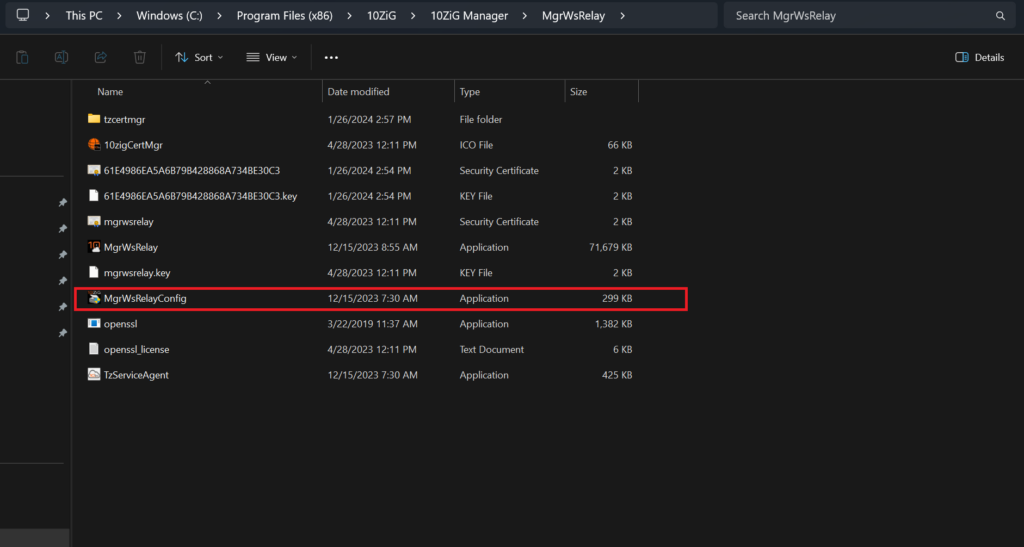
You can easily update the Secure Connector certificate by running the MgrWsRelayConfig program from the following directory: C:\Program Files (x86)\10ZiG\10ZiG Manager\MgrWsRelay

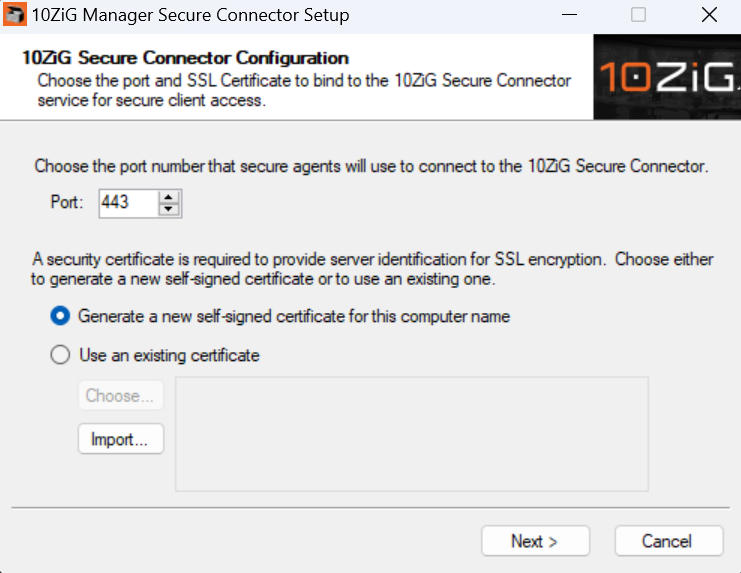
Running the MgrWsRelayConfig application will bring up the 10ZIG Manager Secure Connector Setup menu from where you will have the option to generate a new self-signed certificate or import an already existing cert.

If you would like to use an existing cert, click the “Import” button to import your desired certificate. You may also generate a self-signed certificate if desired.

Once the cert has been successfully imported, please restart the 10ZIG Manager Services to ensure the changes take effect.

I am getting messages in the Syslog that look like the 10ZiG Manager’s MYSQL database is corrupt – how can I fix it?

If the Syslog has messages similar to the ones below, the database is corrupt.

11-07-12 12:53:13:881 10ZiG Syslog Server started.
11-07-2012 12:53:14:006 <Error> MgrServer [DBConnection::ExecuteReader] : Command: ‘SELECT t1.*, t2.name FROM client AS t1 LEFT JOIN locks AS t2 ON t1.id = t2.name WHERE t1.id = ‘8000E0C545EC2C00” Failed : (OdbcException) ERROR [HY000] [MySQL][ODBC 3.51 Driver][mysqld-5.0.67-community]Table ‘.\tenzigmgr\client’ is marked as crashed and should be repaired
11-07-2012 12:53:14:006 <Error> MgrServer [DAOThinClient::Get] : System.NullReferenceException: Object reference not set to an instance of an object.

at Tenzig.Manager.Server.Data.DAOThinClient.Get(String id)
11-07-2012 12:53:14:975 <Error> MgrServer [DBConnection::ExecuteScalar] : Command: ‘SELECT COUNT(*) FROM client WHERE id = ‘8000E0C545F0FC00” Failed : (OdbcException) ERROR [HY000] [MySQL][ODBC 3.51 Driver][mysqld-5.0.67-community]Table ‘.\tenzigmgr\client’ is marked as crashed and should be repaired
11-07-2012 12:53:14:975 <Error> MgrServer [DBConnection::ExecuteNonQuery] : Command: ‘INSERT INTO client (id, platform, authorized, mac, wlan, lastip, name, type, vers, hw, ewf, domain_membership, domain_name, info, agent, time_stamp) VALUES(?, ?, ?, ?, ?, ?, ?, ?, ?, ?, ?, ?, ?, ?, ?, ?)’ Failed : (OdbcException) ERROR [HY000] [MySQL][ODBC 3.51 Driver][mysqld-5.0.67-community]Table ‘.\tenzigmgr\client’ is marked as crashed and should be repaired
11-07-2012 12:53:14:990 <Error> MgrServer [DBConnection::ExecuteReader] : Command: ‘SELECT t1.*, t2.name FROM client AS t1 LEFT JOIN locks AS t2 ON t1.id = t2.name WHERE t1.id = ‘8000E0C545F0FC00” Failed : (OdbcException) ERROR [HY000] [MySQL][ODBC 3.51 Driver][mysqld-5.0.67-community]Table ‘.\tenzigmgr\client’ is marked as crashed and should be repaired
11-07-2012 12:53:14:990 <Error> MgrServer [DAOThinClient::Get] : System.NullReferenceException: Object reference not set to an instance of an object.

To repair perform the following:

  1. Shutdown the Manager service and make certain the “TzMySQL

I am not seeing all my thin clients in the 10ZiG Manager and when I look at the SYSLOG it indicates that the program cannot access the database.

The database lock is most likely an issue with the anti-virus software installed on the PC – exclude the 10ZiG Manager and MYSQL programs in the anti-virus program and the 10ZiG Manager should pick the thin clients.

I have a PXE server in place already so I don’t want to use the 10ZiG Manager as a PXE server – how can I use the existing PXE server to push out images to thin clients?

  1. Copy all the files from the tftp folder from the 10ZiG Manager install folder to the existing PXE server in the published files directory.
  2. Place the image in the general repository directory on the existing PXE server.
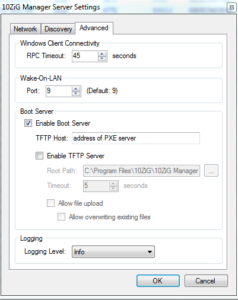
  3. Go into the manager server settings (right click on the ICON down near the time on your PC and select settings) – Advanced Tab – Uncheck Enable TFTP server and under the TFTP Host put the IP of the existing PXE server. Boot the thin client in PXE mode and you should be able to restore the image from the existing PXE server.

How do I use the hot keys in UltraVNC viewer on a Linux thin client through the 10ZiG Manager?

The 10ZiG Manager uses UltraVNC viewer for shadowing thin clients. This viewer provides various additional features like chat and file transfer. These features can be accessed via hot key sequences that begin with “Ctrl+Alt

What ports are used by the 10ZiG Manager?

The 10ZiG Manager communicates with the various thin clients on several network ports that will conflict with existing DHCP or Active Directory functionality; therefore, it is recommended that the Manager not be installed on computers that already host these services such as domain controllers.

Following are the associated ports for the 10ZiG Manager:

  • Network Ports and Purpose
    • TCP 3306 – Used by the local MySQL service hosting the Manager database.
    • TCP 11132 – The Manager Console retrieves information from the Server via this port.
    • TCP 11133-11147 – A Manager Console will register one of the ports in this range, usually 11133, with the Server to receive various notifications.
    • TCP 445 – Used in the PXELinux image for authentication to the ImageStore share.
  • Client Discovery and Communication Ports
    • UDP/TCP 52500 – Broadcast discovery port for Windows (XTC Agent).
    • TCP 52510 – This RPC port is used by Manager Server to perform remote operations and queries on Windows (XTC Agent) clients.
    • TCP 52511 – This RPC port is used Windows (XTC Agent) clients to notify the manager server when they come online or are going offline.
    • TCP 80/443 (HTTP/HTTPS) -These Web ports are used by Manager Server to query information from and perform operations on Linux clients.
    • TCP 8001 – The Manager Server publishes firmware update packages for Linux clients on this port.
  • Template Port – Linux
    • WEBDAV on port 80 for standard connections or a websocket tunnel on client initiated webtunnel in the case of “cloud connected” (default cc port would be 443).
  • PXE Boot Ports
    • UDP 67 (DHCP/BOOTP)- The Manager Server responds to DHCP/BOOTP requests from this port for PXE-Booting clients for image deployment/recovery.
    • UDP 68 (DHCP/BOOTP)- The client listens for responses to DHCP/BOOTP requests from manager server for image deployment/recovery.
    • UDP 69 (TFTP) – When PXE-Booting, the PXE configuration and boot image are transferred to the client via TFTP
  • Syslog Port
    • UDP 51

Cloud Connector Ports

    • 443 – or whatever port you assigned the CC.

Tip: If you are unable to PXE boot from your 10ZiG Manager, run a command prompt and type in netstat -abp udp to find out what services are bound to your ports.

A working example should look like this

UDP(DHCP/BOOTP) 0.0.0.0:67
[MgrService.exe]
UDP(TFTP) 0.0.0.0:69
[MgrService.exe]

Where can I find a setup guide for the 10ZiG Manager Cloud Connector?

Click here to download the 10ZiG Manager Cloud Connector Set Guide.

How do I remove previously saved sysprep files?

The sysprep settings are stored within the database. However, if you need to remove previously saved settings:

  1. Choose the desired configuration from selection panel of the “Clone System Image

I’m getting messages in the SYSLOG that looks like the 10ZiG Manager’s MYSQL database is corrupt – how can I fix it?

If the Syslog has messages similar to the ones below, the database is corrupt.

11-07-12 12:53:13:881 10ZiG Syslog Server started.
11-07-2012 12:53:14:006 <Error> MgrServer [DBConnection::ExecuteReader] : Command: ‘SELECT t1.*, t2.name FROM client AS t1 LEFT JOIN locks AS t2 ON t1.id = t2.name WHERE t1.id = ‘8000E0C545EC2C00” Failed : (OdbcException) ERROR [HY000] [MySQL][ODBC 3.51 Driver][mysqld-5.0.67-community]Table ‘.tenzigmgrclient’ is marked as crashed and should be repaired
11-07-2012 12:53:14:006 <Error> MgrServer [DAOThinClient::Get] : System.NullReferenceException: Object reference not set to an instance of an object.

at Tenzig.Manager.Server.Data.DAOThinClient.Get(String id)
11-07-2012 12:53:14:975 <Error> MgrServer [DBConnection::ExecuteScalar] : Command: ‘SELECT COUNT(*) FROM client WHERE id = ‘8000E0C545F0FC00” Failed : (OdbcException) ERROR [HY000] [MySQL][ODBC 3.51 Driver][mysqld-5.0.67-community]Table ‘.tenzigmgrclient’ is marked as crashed and should be repaired
11-07-2012 12:53:14:975 <Error> MgrServer [DBConnection::ExecuteNonQuery] : Command: ‘INSERT INTO client (id, platform, authorized, mac, wlan, lastip, name, type, vers, hw, ewf, domain_membership, domain_name, info, agent, time_stamp) VALUES(?, ?, ?, ?, ?, ?, ?, ?, ?, ?, ?, ?, ?, ?, ?, ?)’ Failed : (OdbcException) ERROR [HY000] [MySQL][ODBC 3.51 Driver][mysqld-5.0.67-community]Table ‘.tenzigmgrclient’ is marked as crashed and should be repaired
11-07-2012 12:53:14:990 <Error> MgrServer [DBConnection::ExecuteReader] : Command: ‘SELECT t1.*, t2.name FROM client AS t1 LEFT JOIN locks AS t2 ON t1.id = t2.name WHERE t1.id = ‘8000E0C545F0FC00” Failed : (OdbcException) ERROR [HY000] [MySQL][ODBC 3.51 Driver][mysqld-5.0.67-community]Table ‘.tenzigmgrclient’ is marked as crashed and should be repaired
11-07-2012 12:53:14:990 <Error> MgrServer [DAOThinClient::Get] : System.NullReferenceException: Object reference not set to an instance of an object.

To repair perform the following:

  1. Shutdown the Manager service and make certain the “TzMySQL

I’m attempting to update my Linux thin client using a downloaded or .tar file, but it starts and fails immediately.

Check to see if the .tar file was renamed when it was downloaded. The 10ZiG Manager looks for a specific naming convention when it starts the firmware option, if that naming convention does not match up to what it requires it will fail. If this is the case, rename the file back to the original name and try the firmware update again.

Become a 10ZiG Ready Partner

Apply to become a 10ZiG Ready Partner HERE and let’s start creating great stories together.

Get Your 30-Day
Free Demo

Experience the power of 10ZiG risk-free. No credit card. No obligation.